Little Stars Brush: A Practical Guide to Using This Charming Font in Your Work
Typography choices often sit at the intersection of aesthetics and function. When you need a typeface that feels personal without sacrificing readability, script fonts can be a compelling option. Little Stars Brush offers a distinct solution: it combines the warmth of cursive handwriting with the textured, organic quality of a painted brush stroke. This isn't merely a decorative font — it is a practical tool for projects where tone, personality, and approachability matter.
Understanding where Little Stars Brush fits into a broader creative or professional workflow helps you decide whether it serves your specific needs. Below, we explore how this font behaves in real-world use, what it pairs well with, and how to integrate it smoothly into your routine — whether you design marketing materials, create educational content, or build a brand identity.
What Little Stars Brush Offers Beyond Appearance
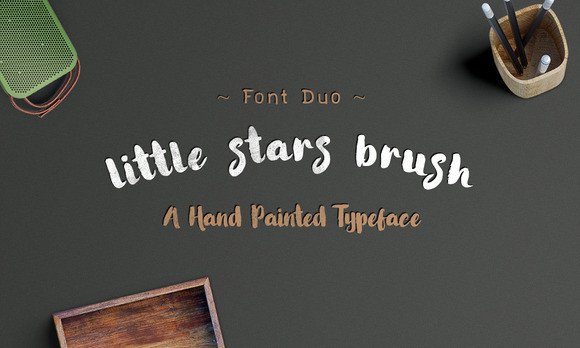
At first glance, Little Stars Brush looks playful. Its irregular stroke widths and gentle curves evoke the feel of marker on paper. But for professionals and creators, the value lies in its utility. This font is not just about looking cute — it is designed to be legible at moderate sizes while retaining the character of hand-lettering. That makes it suitable for headlines, short phrases, pull quotes, and signage where you want human warmth to come through.
The brush texture adds depth that a standard digital script cannot replicate. When you pair it with solid, neutral backgrounds or subtle textures, the letterforms gain a tactile quality. For product labels, event invitations, or children’s book covers, this tactile impression helps the design feel crafted rather than templated.
How It Differs from Standard Script Fonts
Many cursive fonts aim for perfect consistency — each letterform repeats identically. Little Stars Brush embraces variation. The brush strokes introduce natural weight shifts, making repeated characters feel organic. If you are designing a banner or a poster where the same letter appears multiple times, this variability reduces the sense of digital repetition.
Additionally, the font includes a full set of uppercase and lowercase characters, numerals, and basic punctuation. This completeness means you can rely on it for short bodies of text, not just display use. However, because of its handwritten nature, it works best for limited word counts — think taglines, headers, or callout boxes rather than long paragraphs.
Where Little Stars Brush Fits in Your Workflow
Integrating a new font into your process requires thinking about timing, compatibility, and context. Little Stars Brush can be introduced at multiple stages depending on what you are building.
Before a Project: Setting the Visual Tone
When you are planning a new design — whether for a client, a product launch, or a personal brand — choosing your primary typeface early helps define the mood. Little Stars Brush signals friendliness, creativity, and a hands-on approach. If your project targets parents, educators, children, or anyone who responds to warmth, selecting this font at the outset gives you a reference point for colors, imagery, and layout style.
- Brand identity work: Use it as the display font for logos or hero text in a brand that wants to appear approachable.
- Content planning: If you are creating a series of social media templates, test Little Stars Brush in mockups to see how it reads on mobile screens.
- Client onboarding: Presenting a font like this early in the process helps clients visualize a friendlier direction before you invest time in detailed layouts.
During a Project: Practical Implementation
Once you are actively designing, Little Stars Brush integrates with most design platforms. It works as a standard OTF or TTF file, so you can install it in software like Adobe Illustrator, Photoshop, Canva, Procreate, or even web design tools through CSS @font-face embedding. Here are concrete ways to use it in the middle of your workflow:
- Pair with a clean sans-serif body font. Little Stars Brush handles headlines; pair it with something like Open Sans, Lato, or Montserrat for body text. This contrast keeps layouts readable while preserving personality.
- Adjust tracking and leading. Because brush fonts have loose letterforms, adding a small amount of letter-spacing (2–5%) improves legibility in all-caps or longer phrases.
- Layer over textures. Place the font over subtle paper, fabric, or watercolor textures to enhance the painted effect. Reduce opacity on the texture layer to avoid competing with the text.
- Test at different sizes. At 24pt and above, the brush strokes remain clear. Below 18pt, readability drops, especially on screens. Reserve smaller sizes for decorative accents only.
After a Project: Quality Control and Consistency
After you export a design, it pays to review how Little Stars Brush renders across devices and print formats. If you used it in a web design, check the font fallback stack. If you printed on uncoated paper, evaluate whether the brush strokes bleed or lose definition. For long-term brand use, create a style guide that specifies exactly where this font is allowed — and where a simpler fallback replaces it.
One practical step: save a master file with the font outlined (converted to paths) for production assets. This avoids missing font issues during print or handoff to collaborators. For digital use, consider subsetting the font file to include only the characters you need, reducing load time on websites.
Real Use Cases and Workflow Examples
Little Stars Brush is versatile enough to appear in several professional contexts. Below are three scenarios that show how it integrates with different types of work.
Classroom Materials and Educational Resources
Teachers and educational content creators often need materials that feel inviting to young learners. Worksheets, classroom posters, and reading aids benefit from a font that mimics handwriting without being messy. Little Stars Brush works well for:
- Bulletin board headers
- Reward charts and name tags
- Cover pages for activity books
- Instructional labels on classroom supplies
Pair it with a rounded sans-serif font for body instructions. Keep the brush font to short titles — children are still learning to decode letters, so clarity matters. Test the font size against your printer’s output to ensure strokes don’t fill in at small sizes.
Small Business Branding and Packaging
Entrepreneurs selling handmade goods, organic products, or children’s items can use Little Stars Brush to communicate authenticity. A jar of honey, a box of cookies, or a set of natural soaps gains a crafted feel when the label uses this typeface.
In your design workflow, start by sketching label layouts on paper, then move to software. Place the font on a circular or rectangular label template. Add a thin stroke outline around the text if the background is busy — this improves contrast without losing the brush feel. For product lines, use the font consistently across all SKUs to build recognition.
One caution: if your packaging requires regulatory text (ingredients, barcodes, net weight), use a standard sans-serif for those elements. Reserve Little Stars Brush for the product name, tagline, and brand mark. This keeps compliance information legible while maintaining visual appeal.
Event Invitations and Personal Projects
Freelancers and hobbyists planning weddings, birthday parties, or community events can adopt this font for digital and print invitations. Because it resembles hand-lettering, it reduces the need for custom calligraphy — saving time and cost.
- Digital invites: Use the font in Canva or Adobe Express. Pair with a soft pastel color palette. Export as PNG or PDF for email or social sharing.
- Print invites: Set the main event name in large brush text. Add a textured background (e.g., kraft paper or watercolor wash). Print on matte cardstock for best results.
- Follow-up materials: Use the same font for thank-you cards, place cards, or signage at the event. Consistency across all touchpoints strengthens the theme.
Practical Tips for Long-Term Use
If you plan to use Little Stars Brush repeatedly — across seasons, products, or content series — here are considerations to keep your workflow efficient and your output consistent.
Organization and Asset Management
Store the font file in a dedicated project folder along with any style guide notes. If you work in a team, add the font to a shared asset library or cloud drive so everyone uses the same version. Avoid renaming the file — keep the original name to prevent confusion with future updates.
Compatibility Across Platforms
Test the font on the operating systems and software you commonly use. Little Stars Brush generally works on both Mac and Windows, but some older design tools may not support advanced OpenType features. If you notice missing ligatures or alternate characters, check whether your software supports OT features or consider switching to a more standard font for that specific project.
Efficiency in Repeated Use
Create reusable templates that include Little Stars Brush. For instance, build a social media post template in Canva with the font set for the headline area. Save it as a brand kit asset. For print, create an Adobe InDesign template with predefined paragraph styles that apply the font instantly. This reduces setup time for future projects.
Quality Control Checks
Before finalizing any project, run a quick checklist:
- Does the font render clearly at the intended size?
- Are there any characters that look broken or too faint?
- Is the contrast with the background sufficient?
- Have you embedded or outlined the font in the final file?
These checks take five minutes but prevent costly reprints or digital resharing.
Why Little Stars Brush Works for a Wide Audience
The appeal of this font extends beyond children’s themes. Marketers use it to soften a corporate message. Bloggers use it to add personality to headers. Small business owners use it to stand out on crowded store shelves. The common thread is that it communicates effort and care — two qualities that resonate with adults who are tired of sterile, automated design.
Because it is a brush font, it also carries an implicit message of imperfection and humanity. In an era of polished digital everything, a slightly irregular letterform can feel authentic. That authenticity is valuable for anyone building trust with an audience.
Final Observations on Integration
Little Stars Brush is not a font you use everywhere — it is a font you use deliberately. Its best applications are in short-form, high-visibility text where you want to leave an emotional impression. Integrating it into your workflow means planning where that impact matters most and reserving it for those moments.
Whether you are preparing a classroom handout, designing a product label, or building a brand from scratch, take the time to pair it thoughtfully, test it thoroughly, and document its usage. The result will be a consistent, professional outcome that still feels personal.
Typography is a tool like any other. When you choose a tool that fits your process and your purpose, the work becomes easier — and the result speaks for itself. Little Stars Brush offers that fit for anyone who needs a friendly, handcrafted voice in their designs.