Penelopa: A Practical Guide to Using This Elegant Calligraphy Font in Your Workflow
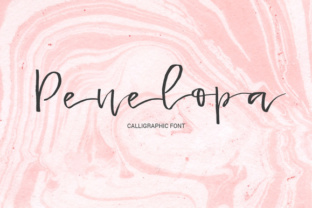
Typography choices often feel deceptively simple. You pick a font, you apply it, and you move on. But anyone who has spent time refining a brand identity, formatting a publication, or designing a set of marketing assets knows that a single typeface can shift the entire tone of a project. That is where Penelopa enters the conversation. It is a sweet thin calligraphy-style font defined by elegant thin handwritten lines. At first glance, it looks like something reserved for wedding invitations or greeting cards. But if you look closer, you will see a versatile tool that can enhance a range of professional and personal workflows.
This article walks through what Penelopa actually is, where it fits into real projects, and how you can integrate it into your own process without forcing it. Whether you are a freelancer assembling a client deck, a small business owner refining your visual identity, or a creator building a consistent content aesthetic, Penelopa offers something practical beneath its delicate surface.
Understanding Penelopa and Its Place in Design Workflows
Penelopa belongs to the family of calligraphy-style fonts, but it distinguishes itself through restraint. The thin strokes are not fragile in the way some light fonts can be. They carry a deliberate lightness that feels handwritten without being messy. The letterforms maintain clarity even at smaller sizes, which is not always true for script fonts. This makes Penelopa usable beyond decorative headlines.
In a typical design workflow, you need typefaces that serve distinct roles. A sturdy sans-serif might handle body copy. A serif might anchor headings. And a script or calligraphy font often lands in the accent role. Penelopa fits naturally into that accent position, but it also works as a primary display face when the context calls for elegance. Understanding where it belongs in your type system is the first step to using it well.
Think of Penelopa as a tool for moments where you want to signal care, nuance, or a human touch. It is not a workhorse font for dense paragraphs. It is a finishing detail that can elevate a layout when used deliberately.
Before You Start: Preparing to Use Penelopa Effectively
Integration begins before you ever place a single character on a canvas. Preparation matters, especially with a font as visually specific as Penelopa.
First, evaluate the context. Ask yourself what role the font will play. Will it appear in a digital context like a website hero section, or in print like a brochure cover? Penelopa performs well on both, but the rendering environment affects how thin strokes appear. On screen, especially at smaller sizes, test the font against different background colors. Light backgrounds are safe, but dark backgrounds can cause thin strokes to feel even thinner due to contrast blooming.
Second, pair Penelopa with supporting typefaces. Because Penelopa carries a delicate handwritten quality, it benefits from a clean, neutral counterpart. A simple sans-serif like Open Sans, Lato, or even a system font works well. The contrast between the organic strokes of Penelopa and the structured geometry of a sans-serif creates visual interest without competing for attention.
Third, collect sample use cases before committing to a full project. Place Penelopa into a few placeholder layouts. Try it as a single-word headline, a pull quote, a subheading, and a short block of display text. See how it behaves in each scenario. This upfront testing saves rework later and gives you a sense of the font's natural range.
Integrating Penelopa into Creative Projects
Creative work often involves balancing expression with legibility. Penelopa supports that balance when you treat it as a deliberate choice rather than an accent thrown in for flair.
In branding projects, Penelopa works well for logotype exploration. If you are developing a visual identity for a boutique business, a creative professional, or a lifestyle brand, the handwritten quality adds a human layer. Pair it with a clean monogram or a simple icon, and you have a mark that feels approachable but refined. For brand guidelines, specify Penelopa for primary display use only. Reserve it for headlines, taglines, and short phrases where the elegance of the strokes can land fully.
In editorial design, Penelopa fits beautifully into section openers, chapter titles, and pull quotes. Because the font is thin and light, it leaves plenty of breathing room around the text. Use generous white space to protect the strokes from feeling crowded. In a magazine layout or a digital publication, a single Penelopa word set large against a clean background can act as a visual anchor for the spread.
For social media content, Penelopa brings a handcrafted feel to quote cards, announcements, and product highlights. Apply it to platforms where visual polish matters, such as Instagram, Pinterest, or LinkedIn. The thin lines read well when paired with soft gradients, neutral tones, or monochrome palettes. Avoid busy backgrounds that compete with the letterforms.
Using Penelopa in Business and Marketing Materials
Business contexts often default to safe, neutral typography. But safe does not always mean effective. Penelopa offers a way to stand out without being loud.
In email marketing, use Penelopa sparingly in headers or call-out lines. A subject line preview or a section header in Penelopa can draw the eye before the reader scrolls. Because email clients render fonts inconsistently, consider using Penelopa in image-based headers rather than live text. This ensures the visual integrity of the strokes across all inboxes.
For presentation decks, Penelopa works well on title slides, divider slides, and closing quotes. A single word in Penelopa on an otherwise minimal slide creates a memorable visual pause. In client-facing materials, this kind of detail signals that you care about the polish of your deliverables.
On product packaging or labels, Penelopa can serve as the primary brand typeface for small-batch or artisanal products. The handwritten quality supports narratives around craftsmanship, care, and authenticity. If you are designing for a product that benefits from a handmade perception, Penelopa reinforces that message without needing additional decorative elements.
Practical Implementation Tips for Consistency and Quality
Consistency with a font like Penelopa comes down to usage rules. Establish a simple set of guidelines early and stick to them.
Define a minimum size for Penelopa in both digital and print. Because the strokes are thin, going too small sacrifices legibility. A good rule of thumb is to avoid using Penelopa below 18 points on screen and below 14 points in print. For body copy or small captions, switch to your supporting typeface.
Manage letter spacing carefully. Penelopa has natural handwritten rhythm, but you may want to adjust tracking for specific applications. In headlines, slight positive tracking can improve readability. In short phrases, tighter spacing can emphasize the flow of the strokes. Preview each adjustment at the actual output size.
Pay attention to line height. Because the font is light, generous line spacing prevents the text from feeling dense. In multiline settings, increase line height by 1.5 to 2 times the font size. This gives each line room to breathe and maintains the airy quality that makes Penelopa effective.
Color choices also affect perception. Penelopa in a dark charcoal or deep navy on a white background retains its elegance while improving contrast. On colored backgrounds, test the font in white or a lighter tint. Avoid pure black, which can feel too harsh against the delicate strokes.
Organizing Penelopa in Your Asset Workflow
Long-term use of any font requires organization. If you manage multiple typefaces across projects, keep Penelopa accessible within your font management system. Tag it with relevant metadata: calligraphy, script, thin, handwritten, elegant, decorative. This makes retrieval fast when you are in the middle of a project and need a specific feel.
Create project templates that include Penelopa already paired with your chosen supporting typefaces. A brand template, a social media template, and a presentation template each can have Penelopa placed in its intended role. This eliminates the friction of reassigning typefaces every time you start a new file.
Document your usage rules in a simple style guide or project notes file. Even a short list of dos and don'ts helps maintain consistency when multiple people access the same assets. Include example pairings, minimum sizes, color recommendations, and background guidelines.
Efficiency and Quality Control in Daily Use
Efficiency with Penelopa means reducing decision fatigue. When you know exactly where and how to use the font, you stop second-guessing yourself mid-project.
Batch similar tasks together. If you are designing a series of social graphics, apply Penelopa to all headers in one session. This allows you to see how the font behaves across the set and make adjustments globally rather than piece by piece.
Quality control requires checking the font in context. Zoom out. Look at the overall composition rather than individual characters. Does Penelopa draw attention to the right place? Does it feel balanced against other elements? If a piece feels off, the issue is often not the font itself but its placement or proportion relative to the rest of the layout.
When exporting final files, verifying the font rendering is essential. In PDFs, check that strokes remain crisp and consistent. In images, ensure that the resolution supports smooth edges. Thin strokes can alias badly at low resolution, so work at 2x or higher for digital output.
Long-Term Use and Adaptability
Penelopa is not a trend font. Its design roots are in traditional calligraphy, which gives it a timeless quality. This makes it suitable for projects that need to remain relevant beyond a single season. Brand identities, publications, and product lines benefit from a typeface that does not date quickly.
As you use Penelopa across more projects, you will develop an intuition for where it works best. You might start with the obvious applications and later discover unexpected uses. For instance, Penelopa can serve as a stylish list marker in a menu or a delicate divider in a document. The more you experiment within your established guidelines, the more naturally the font becomes part of your visual vocabulary.
Adaptability also means knowing when not to use it. Penelopa is not suited for data-heavy layouts, long body text, or corporate environments that require strict neutrality. Respecting those boundaries is what makes your use of the font effective. Overusing a distinctive typeface diminishes its impact. Reserve Penelopa for moments that matter.
Bringing Penelopa into Your Routine
Integration does not happen overnight. Start small. Add Penelopa to one project and see how it feels. Observe how it changes the tone of your work. Adjust your pairing and sizing based on what you learn. Then expand to another project.
If you collaborate with a team, share a brief note about why you chose Penelopa and where it should be used. This helps everyone understand the rationale and apply the font consistently. Over time, Penelopa can become a reliable part of your design vocabulary rather than a novelty you reach for occasionally.
For freelancers and independent creators, Penelopa adds a layer of polish that sets your work apart. It signals that you pay attention to details. For business owners, it gives your materials a distinctive identity without needing an elaborate visual overhaul. For hobbyists and educators, it brings a handmade warmth to presentations, worksheets, and personal projects.
Penelopa is not the font you use for everything. It is the font you use for the right thing. Understanding that distinction is what makes the difference between forced design and natural integration. Use it where elegance and clarity intersect, and you will find it earns its place in your workflow.