Shellahera Script: What You Need to Know Before Using This Handwritten Font
Handwritten fonts have a way of bringing warmth and personality to design projects that standard typefaces often lack. Shellahera Script is one such typeface—a handwritten script font originally created with a brush pen and scanned at high resolution. Its dancing baseline gives it a lively, organic feel that many designers, entrepreneurs, and content creators find appealing. But as with any specialized font, there are common pitfalls that can turn a promising project into a frustrating experience. Whether you are a freelancer experimenting with branding, a blogger updating your site header, or a small business owner designing your own marketing materials, knowing what to watch out for can save you time, money, and disappointment.
Why Shellahera Script Stands Out
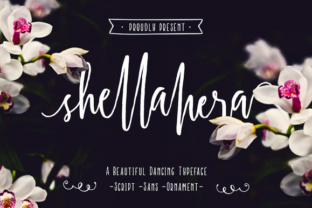
Before diving into the mistakes, it helps to understand what makes this font unique. Shellahera Script is not a digital copy of a preexisting script; it is drawn using a real brush pen, then scanned at a resolution that preserves the subtle pressure changes and ink variations. The result is a typeface that feels handwritten rather than mechanically generated. The dancing baseline—where letters rise and fall slightly instead of sitting on a flat line—adds rhythm and movement. This is ideal for projects that need a human touch: wedding invitations, social media graphics, product labels, logos for artisanal or lifestyle brands. However, that same liveliness can work against you if you apply it carelessly.
Common Mistake #1: Using Shellahera Script for Body Text
One of the most frequent errors I see is treating Shellahera Script as a general-purpose font for large blocks of text. Because it is a script with a pronounced dancing baseline, reading multiple sentences set in this font quickly becomes tiring. The uneven letter heights and connecting strokes that look beautiful in a short phrase become overwhelming in a paragraph.
The better approach: Reserve Shellahera Script for display purposes—headings, short taglines, pull quotes, or single words. For body copy, pair it with a clean, neutral sans-serif or serif font. A simple combo like Shellahera for the title and a lightweight geometric sans for the text keeps readability high while preserving the handcrafted character.
Mistake #2: Ignoring the Dancing Baseline When Aligning Elements
The dancing baseline is what gives Shellahera its natural, flowing look. Yet many designers try to force it onto a strict grid, only to discover that letters dip below or rise above the expected line. This can cause odd spacing issues when aligning with other design elements, such as images, borders, or other text.
For example, if you center a Shellahera title inside a rectangle and the letters at the end of the word drop noticeably lower, the visual balance will feel off. The fix is simple: adjust your layout to accommodate the font’s natural motion. Use manual tracking and kerning in your design software to fine-tune letter spacing, and leave extra padding around the text area so no part of the script gets cut off.
Practical Tip: Test Your Layout First
Before committing to a full design, create a mockup with the exact words you plan to use. Zoom in and check how the dancing baseline interacts with other elements. A little adjustment at this stage prevents a disproportionate final output.
Mistake #3: Choosing the Wrong Contrast in Background Colors
Because Shellahera Script was created from a brush pen scan, it has natural thin and thick strokes. On a busy background or a color that is too close to the font’s weight, those delicate thin strokes can disappear entirely. I have seen wedding invitations where the script became nearly illegible on a floral backdrop, and social media quotes that got lost over a gradient.
How to avoid this: Always preview your design at the actual intended size. The font needs high contrast—usually a dark script on a light background or a light script on a dark, solid background. Avoid placing it over images with high detail unless you add a semi-transparent overlay or a shadow effect that defines the letters. A good rule of thumb: if you have to squint to read the text, the contrast is too low.
Mistake #4: Overlooking Licensing Before Purchase
This is a practical mistake that can have real consequences. Many script fonts, including Shellahera Script, are sold under specific licenses that restrict usage. A personal desktop license might allow you to use it on one computer for client work, but a separate license might be required for embedding the font in a website, a mobile app, or a product you sell. I have known freelancers who used a personal license for a logo that was later trademarked—only to find out they needed a commercial license.
Advice: Before downloading or buying, read the license terms carefully. Look for details about number of users, commercial use, web embedding, and whether you can modify the font. If you are a small business owner creating a logo that you will use on your website, store, and packaging, invest in a license that covers all those use cases. It is a small upfront cost that prevents legal headaches and ensures you are using the font ethically.
Mistake #5: Neglecting to Check Language Support and Special Characters
Shellahera Script is beautiful, but not every language or symbol is included. Many handwritten fonts have limited character sets—they may lack accented letters, currency symbols, or punctuation that you need for your content. If you are a blogger writing in English but occasionally use French or Spanish names, you might find that the é or ñ is missing or poorly designed.
Better approach: Before purchasing, download the font’s character map or look at a complete specimen online. Check the letters, numbers, and common punctuation you will rely on. If you need extended language support, ask the seller if they have an updated version or look for a complementary font that covers those gaps.
Mistake #6: Relying on Default Settings for Letter Spacing
Default kerning in design software is often optimized for traditional typefaces, not for scripts with a dancing baseline. When you type a word in Shellahera, the default spacing might cause certain letter combinations to look disconnected or, conversely, too tightly jammed. This is especially noticeable with pairs like “ff” or “tt” where strokes can clash.
How to fix it: After typing your text, manually adjust the tracking and kerning. In Adobe software, you can use the character panel to tweak pairs. For logos or short phrases, spend a couple of minutes going letter by letter. The result will be a polished, professional look that does justice to the font’s handcrafted origins. Many designers skip this step, yet it is one of the most impactful for final quality.
Mistake #7: Forgetting to Test on Different Devices and Screens
A script font that looks perfect on your high-resolution monitor might appear blurry or too thin on a phone or a lower-quality screen. Since Shellahera Script is scanned from a brush pen, the stroke contrast is high, which can lead to poor rendering on small screens if not optimized.
Practical advice: If you plan to use the font on a website or in digital media, test it on multiple devices—a phone, a tablet, and at least two different browsers. Consider using a slightly bolder weight if available, or setting the font size larger than you would for a sans-serif. For print, always do a test print at actual size to see how the ink interacts with paper. The subtle brush textures often become more pronounced on certain paper stocks.
Putting It All Together: A Smarter Way to Use Shellahera Script
Shellahera Script is not just a font; it is a design element that brings authenticity and emotion to your work. The mistakes outlined above come from seeing others—and sometimes myself—use it in ways that diluted its impact or caused unnecessary problems. The solution is always the same: treat it as a deliberate tool, not a default choice. Use it sparingly, adjust spacing, mind contrast, respect licenses, and test thoroughly.
For beginners, start with a single project: a personal monogram, a blog header, or a gift tag. That hands-on experience will teach you more about the font’s behavior than a dozen tutorials. For professionals and business owners, the extra minutes you spend on kerning and contrast will set your branding apart from the cookie-cutter work that relies on safe, boring fonts. The dancing baseline is your ally when you let it lead, not when you force it into a rigid box.
Ultimately, the best use of Shellahera Script comes from understanding its origin—a brush pen in a human hand, scanned into a digital file. Respect that origin, and your designs will speak with a warmth that no synthetic font can replicate.