Amulhed Brush: A Handwritten Font with Extra Ligatures for Creative Workflows
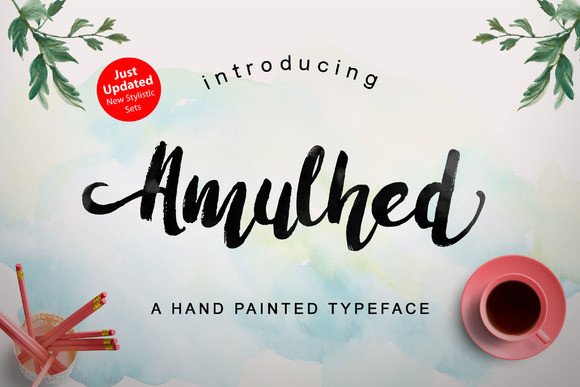
Handwritten fonts occupy a distinct space in typography. They bring personality, warmth, and a human touch to designs that standard sans-serif or serif faces often lack. But not all handwritten fonts are created equal. Many offer only a basic character set, forcing designers to repeat the same letterforms, which quickly looks mechanical. Amulhed Brush solves that problem by packing 128 extra ligatures and stylistic alternates into a single typeface. This means you can craft text that actually looks like natural handwriting, with countless possible combinations. For anyone who works with visual content — whether you’re a brand designer, a social media manager, a small business owner, or a hobbyist — Amulhed Brush is a practical asset that fits into real workflows, not just a decorative afterthought.
What Makes Amulhed Brush Different in a Typography Workflow
When you’re selecting a font for a project, you’re usually balancing legibility, mood, and flexibility. Amulhed Brush leans heavily into the latter two. Its brush-like strokes evoke a casual, hand-painted feel, making it ideal for headlines, logos, invitations, and any piece where you want to stand out. But the real difference is the depth of its character set. The 128 ligatures and alternates are not random — they are designed to replace standard letter pairs and individual characters with more fluid, connected forms. This means that as you type, the font automatically swaps in a different version of a letter or a tied pair (like th or en) to mimic the natural variation of handwriting.
In a typical workflow, you might have to manually adjust letter spacing or insert custom vector graphics to get that organic look. Amulhed Brush handles much of that work automatically, saving time during layout and post-production. It also gives you control: you can toggle between default and alternate glyphs via OpenType features in software like Adobe InDesign, Illustrator, Photoshop, or even in simpler tools that support stylistic sets. This makes it usable both for high-end print projects and for quick social media graphics.
Using Amulhed Brush Before, During, and After a Project
Integration is smoother when you think of a font not as a one-time choice but as a tool that influences multiple stages of a project. Here’s how Amulhed Brush fits at each point.
Before the Project: Planning and Selecting
Before you start designing, you choose your typefaces based on the message and medium. For a handwritten font like Amulhed Brush, consider where you will use it. Will it carry the main headline? A subheading? A single word on a logo? Because of its brush texture and varied glyphs, it works best at medium to large sizes where the ligatures are visible. Plan your color palette and background accordingly — a clean, solid background lets the strokes shine, while a busy texture might hide the subtlety of the alternates.
Also, think about compatibility. Amulhed Brush is available as an OpenType font, which means it works across platforms (Windows, macOS) and in most modern design software. If you use web tools like Canva or Figma, check whether they support OpenType features. For web use, you can embed the font via CSS @font-face and use `font-feature-settings` to enable ligatures. Pre-planning these technical details ensures you don’t hit a wall halfway through your layout.
During the Project: Execution and Application
Once you start designing, the real work begins with typography. With Amulhed Brush, you have two main levers: the default ligatures and the stylistic alternates. Most software will automatically apply standard ligatures, but to access all 128 extras, you’ll need to enable the “Discretionary Ligatures” or “Stylistic Sets” option. In Adobe programs, this is found in the OpenType panel. In Canva or similar tools, you may need to copy-paste from a character map or use a font manager that lets you pick alternates manually.
A practical workflow example: You’re designing a quote graphic for Instagram. Type the quote in Amulhed Brush. Enable discretionary ligatures. The th in “the” becomes a connected stroke, the en in “end” flows differently. Then, for extra flair, replace the first letter “W” with a swash alternate. The whole process takes seconds, but the result looks hand-lettered. If you’re producing a series of graphics, consistency is easy because the font remembers the substitutions — you don’t have to redraw anything.
Another example: designing a wedding invitation suite. Use Amulhed Brush for the couple’s names and main event text. Pair it with a clean serif for body copy. The ligatures will make each invite feel unique, yet every piece is reproducible. For the envelope addressing, you can use the same font to create a cohesive brand impression.
After the Project: Quality Control and Consistency
After your design is laid out, review the text for any awkward letter combinations. Even with 128 ligatures, no font is perfect for every word. Check for common trouble spots: double letters, unusual pairs, or words that look disconnected. In many cases, you can manually override a glyph by selecting a different alternate from the Glyphs panel. This is especially important for logos or key headlines where every visual detail matters.
If you are producing multiple deliverables (social posts, website headers, printed flyers), take a few minutes to standardize which alternates you use for core branding elements. For example, if your company name uses Amulhed Brush, decide the exact ligature combination for the logo and stick to it across all materials. This ensures brand consistency without limiting your creativity for other uses.
Practical Implementation Tips for Different Users
Amulhed Brush is not a one-size-fits-all tool. Different roles will use it differently, and knowing those nuances helps you get the most out of it.
- Graphic designers and illustrators: Use the font as a base for further hand-lettering. The ligatures give you a starting point; you can add texture, shadows, or outlines to make the lettering more dimensional. Pair it with vector brushes for a mixed-media look.
- Small business owners and entrepreneurs: Use it for product labels, signage, and social media headers. The automatic variation saves you from having to hire a lettering artist for every post. Keep a document with all your commonly used words (product names, calls to action) typed in Amulhed Brush with your chosen alternates. Copy-paste into design templates to maintain speed.
- Bloggers and content creators: Apply it to post titles, featured image text, and callout boxes. Because the font is casual, it works well for lifestyle, food, travel, or creative topics. Enable ligatures in your blog’s CSS if you use a self-hosted site, or export images for each post.
- Educators and course creators: Use Amulhed Brush in worksheet headers, lesson slide titles, and printable quotes. The handwritten feel makes materials feel more approachable, especially for younger audiences or creative subjects.
Integrating with Other Tools and Assets
Amulhed Brush works best when combined thoughtfully. Pair it with a clean sans-serif (like Open Sans or Montserrat) for body text — this creates contrast between the organic display font and structured reading text. For print, ensure your printer settings capture fine stroke details (use high-resolution output). For digital, test the font on mobile screens — small sizes may make ligatures hard to read, so reserve it for headings above 24px.
Collaboration is another consideration. If you work in a team, share the font file and a brief guide on how to enable the alternates in your common design software. This prevents coworkers from missing the best features. Licensing is straightforward: most commercial licenses cover standard usage including print, digital, and broadcast. Check the specific terms from the foundry to avoid surprises.
Long-Term Use and Versioning
A font like Amulhed Brush should be part of your longer toolkit. As your brand evolves, you’ll likely revisit it for new projects. Keep a master list of the glyphs you use most often — for example, note which alternate for the letters ‘a’, ‘g’, and ‘e’ you prefer. This makes it easy to start new designs without re-discovering the character set each time. Also, consider that the font may receive updates from the designer (additional ligatures or improved kerning). Subscribe to the foundry’s newsletter or check for updates periodically.
Over months of use, you’ll develop a muscle memory for where to find certain alternates and which words look best. That kind of familiarity is valuable for maintaining both speed and quality. And because Amulhed Brush offers so many combinations, you won’t feel like you’re repeating yourself even after dozens of projects.
Making the Most of 128 Ligatures: Workflow Examples
Let’s walk through a couple of concrete scenarios to see how Amulhed Brush folds into a real process.
Scenario 1: Building a Handwritten Logo in One Hour.
You need a logo for a coffee shop. Open a design file, set the shop name in Amulhed Brush. Enable discretionary ligatures. Experiment with different stylistic sets to find the combination that best reflects the brand’s personality — maybe a swash on the first letter and a connected pair in the middle. Export the logo as a vector. Then, in a separate file, type out taglines and menu headers using the same font settings. You now have a cohesive visual identity ready for menus, signage, and social media. Total time: less than an hour.
Scenario 2: Batch-Producing Social Media Graphics.
You manage five client accounts and need to produce 20 quote graphics per week. Create a template in Canva or Photoshop with a background and a text box. Type each quote, enable ligatures, and manually adjust any awkward connections. Because Amulhed Brush handles most of the variation, you only need 5–10 minutes per graphic. Over a month, that saves hours compared to drawing each letter by hand or manually kerning a standard script font.
These examples show that Amulhed Brush isn’t just a pretty face — it’s a functional part of a design workflow that prioritizes efficiency without sacrificing aesthetic quality.
Final Observations
Typography choices affect how an audience perceives your content. A handwritten font can create emotional resonance, but only if it feels authentic. Amulhed Brush’s 128 ligatures and alternates are designed to break the repetitive look that plagues many script fonts. By integrating it into your process before, during, and after a project, you give yourself a tool that is both expressive and reliable. Whether you’re a solopreneur managing your own marketing or a designer handling multiple clients, this font adds value without adding complexity. The key is to plan its use, take advantage of its OpenType features, and apply it consistently. That approach turns a beautiful font into a practical, long-term asset.