Mabroc: A Unique Line Typeface That Demands Thoughtful Use
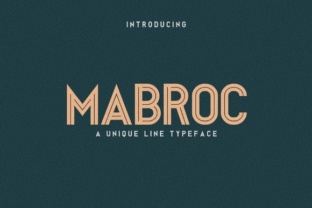
You have likely stumbled across Mabroc while searching for a typeface that feels both modern and distinctive. It is a sans serif font built around clean, continuous lines that give it a structured yet airy appearance. Unlike many geometric sans serifs that lean toward uniformity, Mabroc carries a character of its own — one that works well in logos, badges, posters, and even newspaper headlines. But because it looks so approachable and versatile at first glance, many people end up using it in ways that undermine its strengths. The goal here is not to discourage you from using Mabroc, but to help you avoid the common missteps that can turn a promising design into a regrettable one.
The Mistake of Assuming Mabroc Works Everywhere
One of the most frequent errors is treating Mabroc as a universal solution. Its clean lines and simple letterforms make it tempting to apply across all contexts — from a wedding invitation to a tech startup logo to the body text of a newsletter. But line typefaces, including Mabroc, have a specific visual rhythm that can feel out of place in certain settings. For instance, using it for dense paragraphs in a newspaper might create a reading experience that feels too rigid or light, especially at smaller point sizes.
Better approach: Reserve Mabroc for projects where its linear, open quality can shine — branding, headlines, short-form display text, or any context where you want the typeface itself to be noticed. Test it at the actual size it will be used. A quick digital preview at 72 points tells you very little about how it will perform at 12 points on a printed page.
Overlooking Readability in Smaller Sizes
A related mistake is assuming that because Mabroc looks clear on screen at large sizes, it will remain readable when scaled down. Line typefaces often have thin strokes and generous white space, which can cause letters to appear faint or broken at smaller sizes. This is especially true for light or regular weights. I have seen designers use Mabroc for captions or footnotes only to discover that readers had to squint or lean in to decipher the text.
What to do instead: If you need Mabroc at smaller sizes, choose a bolder weight if available, or increase the tracking slightly to keep letters distinct. Alternatively, use Mabroc only for the display roles and pair it with a more robust body typeface that handles small text better. This preserves the visual interest of Mabroc where it matters most, while keeping the reading experience comfortable.
Ignoring the Importance of Pairing
Another oversight is using Mabroc in isolation for an entire project. Because it has such a distinct linear character, relying on it alone can create a monotonous or overly uniform look. The eye benefits from contrast — a change in weight, proportion, or style that helps guide attention and add depth. When Mabroc is the only typeface, the design can feel flat, even if the font itself is attractive.
Practical advice: Pair Mabroc with a neutral sans serif or a classic serif for body text. For example, use Mabroc for headings and subheadings, then switch to a typeface like Source Sans Pro, Noto Sans, or even a workhorse serif such as Merriweather for longer reading. The contrast will make Mabroc feel more deliberate and intentional, rather than simply the only font you had available. Avoid pairing it with another expressive or decorative font — that often creates visual competition rather than harmony.
Forgetting About Spacing and Kerning
Line typefaces, including Mabroc, often require manual attention to spacing. The clean, open letterforms can make gaps between certain character pairs feel too wide or too tight, especially in all-caps settings or logo treatments. Relying solely on default kerning can lead to uneven texture, which is particularly noticeable in short, prominent text like a business name or a poster headline.
Better approach: After you place Mabroc in your design, take the time to adjust kerning for key letter pairs — especially combinations like "AV," "To," "Wa," or "Ly." In logo work, manual tracking adjustments are almost always needed to achieve a balanced silhouette. Many designers skip this step because they assume the font is already optimized. While Mabroc has solid default spacing, no font can anticipate every layout context. A few minutes of fine-tuning can make the difference between a professional-looking result and one that feels slightly off.
Choosing the Wrong Format or Licensing
A less glamorous but equally important mistake is not checking the licensing terms or file format before downloading or buying Mabroc. Some versions available on free font sites may lack important weights, have limited character sets, or include restrictive licenses that prevent commercial use. This can create problems down the line, especially if you are using Mabroc for a client project, product packaging, or a publication that will be distributed widely.
What to check: Before you commit, verify that the version you are using includes the glyphs you need — things like accented characters, ligatures, or specific punctuation marks if your project requires them. Confirm that the license covers the type of use you plan (personal, commercial, web, embedding). If you are downloading a free version, check whether it is a trial with limited characters or a full release. Paying for a proper license from a reputable foundry is often worth the cost for the peace of mind and quality assurance it brings.
What to Check Before You Commit to Mabroc
Before you download, install, or finalize Mabroc for your project, run through a short checklist to make sure it is the right fit:
- Context: Will Mabroc be used primarily for display or body text? Does its linear quality suit the tone of the project?
- Size: Have you tested it at the actual dimensions it will be rendered at, especially for smaller sizes?
- Pairing: Have you chosen a complementary typeface for body text or secondary elements?
- Spacing: Have you manually adjusted kerning and tracking for key text elements?
- Licensing: Does the license cover your intended use, and does the font include the weights and characters you need?
- Alternatives: Have you compared Mabroc with similar line typefaces to ensure it is the best choice for your specific project?
Taking a few extra minutes to evaluate these points will save you from rework, frustration, or a final result that does not meet your expectations. Mabroc is a genuinely useful typeface when applied with care — it is not a font that will rescue a poorly planned design, but it can elevate one that has been thoughtfully considered.
The most successful uses of Mabroc tend to be those where the designer respected its strengths and worked around its limitations. Use it for impact, for clarity, and for the clean, modern statement it makes. Avoid forcing it into roles where it struggles. With that balance in mind, Mabroc can become a reliable part of your toolkit rather than a font you try once and abandon.