Getting the Most Out of Flanela: A Practical Guide to Script and Sans
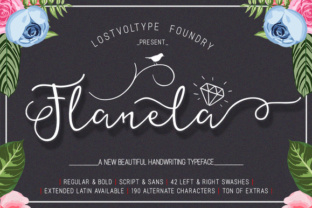
Flanela presents itself as a beautiful calligraphy typeface, and at first glance, that’s exactly what you see—a flowing, elegant script with lovely swashes. But dismissing it as just another pretty script font misses the bigger picture. Flanela is actually a two-part system: a highly detailed script (Flanela Script) and a clean, all-caps monoline sans (Flanela Sans). Together, they offer a versatile toolkit for branding, invitations, and packaging. Yet many creatives and business owners install the font expecting instant magic, only to use a fraction of its potential. If you’ve ever felt your typography looked flat despite using a premium font, the issue likely isn’t the font—it’s how it’s being used. Let’s walk through the common pitfalls and show you how to get real value from Flanela.
The Underused Power of Flanela Sans
When people hear “Flanela,” they immediately think of the script. It’s easy to overlook the sans companion entirely. The Flanela Sans is a simple, all-caps monoline typeface covering basic characters, numerals, and punctuation. On its own, it might seem unremarkable. That’s the mistake—treating it as a standalone generic sans rather than a strategic supporting player.
The real value comes from pairing the two. Use Flanela Script for your main headline or primary brand word, and set supporting text—tagslines, labels, addresses, or secondary headings—in Flanela Sans. This creates an instant visual hierarchy. The ornate elegance of the script contrasts beautifully with the clean, modern simplicity of the sans. Without this pairing, your design can feel incomplete or overly decorative.
A better approach: Before starting a project, decide where the script will lead and where the sans will support. For a wedding invitation, the couple’s names shine in the script, while “Reception to follow” and the date work perfectly in Flanela Sans. This gives you a cohesive, professional system without adding a third font to the mix.
The 190 Alternates: Why Your Current Output Looks Generic
Here’s the detail that changes everything: Flanela Script comes with 190 alternate characters, including swash variants, contextual alternates, and extended Latin support. Most users install the font, type a word, and stop. The result is a decent calligraphy look, but it lacks the custom, handcrafted feel that makes lettering truly stand out.
The mistake is treating Flanela like a standard script where every “a” looks the same. The alternate characters are hidden by default in most software. If you don’t actively swap them in, you’re leaving the font’s core personality on the table.
How to access them:
- In Adobe Illustrator, InDesign, or Photoshop, open the Glyphs panel (Window > Type > Glyphs). Here you can browse every swash and alternate letterform.
- Use the OpenType panel to toggle Stylistic Sets, Contextual Alternates, and Swashes on and off. Experiment with each set to see how the letters transform.
- In word processors like Microsoft Word or Publisher, look for advanced font features or OpenType options in the font dialogue box. Not all applications support this, so check before you commit.
Example in practice: Type the word “Beautiful” in standard Flanela Script. It looks nice but predictable. Now swap the initial “B” for a swash variant, add a flourish to the “l,” and use a contextual alternate for the “u.” The word transforms into something bespoke. This is the difference between using a font and crafting with it.
Context Is Everything: Display vs. Body Text
Flanela Script is a display typeface. It’s designed for impact, not endurance. A common mistake is using it for long paragraphs, body text, or multiple consecutive sentences. The density of swashes, flourishes, and alternate letterforms quickly becomes overwhelming and hard to read. Your audience will struggle to parse the message, and the design loses its elegance.
Flanela Sans, while cleaner, is also not suited for extended body copy. It’s all caps and monoline, which means it lacks the lowercase ascenders and descenders that make long-form reading comfortable. Using it for a full brochure or website article would fatigue the reader.
Better use cases:
- Logos and brand marks
- Wedding invitations and event stationery
- Social media headers and quote graphics
- Product packaging labels
- Short headline or title treatments
What to do instead: Reserve Flanela for where it shines brightest—short, high-impact text. Pair it with a neutral, highly readable body font (like a classic serif or a clean sans) for any long-form content. This respects the typeface’s design and keeps your project professional.
What to Check Before You Buy or Download
Avoiding poor decisions starts before the font ever touches your design software. Here are the critical checks most people overlook:
License type: Are you planning commercial use? A logo for your business? Web embedding on your website? Make sure the license covers your specific needs. Personal use licenses won’t allow you to sell products using the font. Web font licenses require a separate purchase in most cases. Always read the terms from the foundry.
Source reliability: Free download sites often strip out the OpenType features, remove alternates, or even embed malware. The 190 alternate characters and extended Latin are part of what you pay for. If you download a stripped version, you lose the core functionality. Only buy from reputable distributors like MyFonts, Creative Market, FontSpring, or the original foundry.
Language support: Flanela Script covers extended Latin characters. If you need accents, diacritics, or specific European language support, verify the glyph set before purchasing. A quick look at the character map can save you frustration later.
Software compatibility: Do your tools support OpenType features? Canva’s font menu has limited OpenType control, while Adobe apps offer full access. If your primary design tool lacks glyph support, you won’t be able to use the alternates effectively. Work within your tool’s strengths or upgrade your workflow.
The Art of Restraint with Swashes
Flanela’s swashes are beautiful, and they’re one of the main selling points. But using them on every single letter creates visual noise. A swash on every uppercase character, or a flourish on every descender, quickly looks chaotic rather than elegant.
The better approach: Use swashes strategically. Place a single, dramatic swash on the first letter of your primary word. Add a terminal flourish to the last letter. Let the rest of the word sit cleanly. This creates a focal point and gives the eye a place to rest.
Example: In the word “Congratulations,” swap the “C” for a large swash variant and add a subtle tail to the “s.” Avoid adding swashes to the “n,” “g,” “r,” “a,” and “t.” The result looks sophisticated, not busy. Less is genuinely more when it comes to decorative letterforms.
Final Considerations for Your Project
Flanela offers exceptional value as a two-in-one typeface, but it rewards deliberate use. Take time before your project begins to explore the character set. Open the glyph map, test different stylistic sets, and decide where the script leads and where the sans supports. Buy from a trusted source to ensure you get the full set of alternates and proper licensing. And always ask yourself: does this context call for display typography or body text? If it’s short and impactful, Flanela is an excellent choice. If it’s long-form reading, let Flanela be the accent, not the main voice.
By avoiding these common missteps, you’ll save time, frustration, and money—and your final work will reflect the thoughtful craftsmanship that Flanela was designed to deliver.