Besitoea: Using This Vintage-Inspired Font Without Common Pitfalls
If you’ve stumbled upon Besitoea while looking for a typeface that balances personality with readability, you’re likely drawn to its character. Inspired by the look of Asian beer labels, Besitoea (also referred to as Bestitoea by some foundries) offers a clear, slightly worn aesthetic that works beautifully for retro projects. But like any specialized font, using it well requires more than just downloading and typing. Many people make avoidable mistakes that undermine the very appeal they’re trying to achieve. Let’s walk through what Besitoea really is, where it shines, and the missteps that can turn a promising design into a regrettable one.
What Besitoea Is (and What It Isn’t)
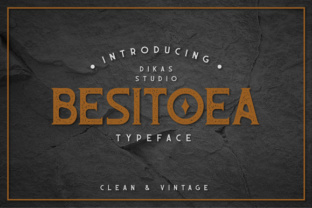
Besitoea comes in at least two distinct styles: Besitoea Regular and Besitoea Vintage. The Regular weight keeps the core letterforms clean and legible, while the Vintage version adds intentional distress and texture that mimics printed labels from decades past. This dual nature makes it versatile, but it also creates confusion. People assume “vintage” is always better, or that the Regular weight lacks character. Neither is true.
The font’s inspiration—Asian beer labels—gives it a specific cultural and commercial flavor. The letterforms often carry a slight horizontal emphasis, open counters, and subtle brush-like terminals. It is not a generic retro script or a grunge typeface. It sits somewhere between a friendly sans serif and a soft display face. Knowing this helps you avoid using it for projects where a more neutral or formal typeface would serve better.
Common Mistake #1: Choosing the Wrong Weight for the Job
One of the most frequent errors I see is defaulting to Besitoea Vintage for every retro application. The distressed look is appealing, but it can quickly become illegible at small sizes or on busy backgrounds. I’ve watched entrepreneurs slap the Vintage weight on a flyer for a craft beer event, only to find that the broken strokes and texture make the phone number unreadable from three feet away.
Better approach: Use Besitoea Regular for body copy, subheadings, or any text under 18 points. Reserve Besitoea Vintage for display purposes—headlines, logos, or short phrases where you want that aged print effect without sacrificing clarity. If you’re working on a digital design, test both weights on actual screens at various sizes. The texture that looks wonderful on a large poster may turn into muddy static on a mobile screen.
Overlooking Readability in Context
Because Besitoea is clear for a display font, people sometimes assume it works as a full-body typeface. That’s a misunderstanding. The design is still rooted in label aesthetics—meant to be read in short bursts, not long paragraphs. Using it for a blog post, a product description, or a multi-page menu will fatigue readers quickly.
I once worked with a small bakery owner who wanted a “vintage feel” for their entire website. They used Besitoea Vintage for everything from headlines to ingredient lists. The result was charming at first glance, but customers complained the text was hard to follow. We switched to Besitoea Regular for body elements and paired it with a simpler sans serif for the smallest text. Complaints dropped overnight.
Practical rule: If you have more than 15–20 words in a single block, consider using a complementary companion font for readability. Besitoea pairs well with clean geometric sans serifs (like Montserrat or Poppins) or simple slab serifs that echo its horizontal feel without competing.
Mistake #2: Ignoring the Full Character Set
Another oversight happens when designers only look at the default alphabet and numbers. Besitoea’s charm lies partly in its alternate glyphs, ligatures, and punctuation styles. Many users download the font, type their text, and never explore the extra characters. That’s fine if you’re in a hurry, but it means you miss out on the very elements that make the font special—like stylized ampersands or decorative beer-themed ornaments (if the version you have includes them).
What to check: Before committing, open the font in a character map or a tool like Font Book. Look for variations in uppercase, accented letters suitable for multilingual projects, and any bonus characters like arrows or stars. If you’re designing a label or a poster, those extras can save you hours of illustrating small details.
Also confirm the font supports the languages you need. Besitoea, like many display typefaces, may have limited diacritic support. I’ve seen projects that looked perfect until the designer needed a cedilla or a tilde and found only a placeholder box. Always test a full sentence in your target language before purchasing or downloading.
Using Besitoea on the Wrong Medium
This font was born from the world of printed beer labels—think textured paper, offset printing, and ink bleed. That heritage means it often looks best when paired with tactile or slightly imperfect media. On a pristine white screen with zero texture, the Vintage version can feel flat or even artificially dirty.
Many people make the mistake of using Besitoea Vintage on high-gloss digital materials without any background texture. The result can look like a cheap filter was applied. If you’re using it on a website, consider adding a subtle paper grain or a semi-transparent overlay to the background. For printed items, choose a matte or uncoated paper stock that echoes the original label feel. The difference is subtle but meaningful to your audience.
Better practice: For digital projects where you can’t control the background, lean toward Besitoea Regular. It retains the vintage flavor in its letterforms without relying on texture for effect. Use it in headings where you can add a tinted background block or a border that hints at a label shape.
Licensing and Source Confusion
This is an area where many creators, especially beginners, run into trouble. Because Besitoea is sometimes labeled under different names (Besitoea, Bestitoea) and appears on various free font sites, it’s easy to grab a copy without reading the license. Some versions are free for personal use only; others require a commercial license even for one product label.
I once saw a small business owner use what they thought was a free font on their product packaging. The designer who originally created the font (or the foundry that licensed it) sent a cease-and-desist. The packaging had to be redesigned at significant cost. Don’t skip this step.
What to do: Always download from a reputable source like a type foundry, a font marketplace (MyFonts, Fontspring, etc.), or the designer’s own site. Check the license terms for commercial use, number of users, and any restrictions on embedding in apps or websites. If you see Besitoea listed as “100% free,” verify that it’s truly free for your intended use—or look for an official free version with a clear license.
Mistake #3: Over-Accessorizing with Vintage Elements
Enthusiasm for the retro vibe can lead people to layer in too many vintage effects—drop shadows, worn textures on top of the already distressed font, sepia tones, or decorative borders that compete with the type. The result is a cluttered, muddy mess that loses the clarity Besitoea was designed to provide.
Keep it simple: Let the typeface itself do most of the work. If you’re using Besitoea Vintage, you don’t need extra noise. A clean background, one accent color, and careful spacing will highlight the font’s distressed details. If you feel you need more decoration, choose one extra element: a modest border, a subtle halftone pattern, or a single icon. The label inspiration works because the typography is the hero.
Testing Before You Commit
Before you finalize any design with Besitoea, run a few quick tests. First, print a sample at the intended size—mock up the label, the headline, or the sign. Look at it from the distance your audience will view it. Is the Vintage texture interfering with legibility? Are the counters closing up in the Regular weight?
Second, test the font in black on white, white on black, and against a mid-tone color. Some versions of Besitoea have lighter stroke weights in certain letters; contrast loss can make those letters disappear on a dark background. Adjust size, weight, or color accordingly.
Third, show your design to someone who hasn’t seen it—ideally a person in your target demographic. Ask them what word stands out first. If it’s not the message you intended, your font choice or hierarchy may need adjustment.
A Final Word on Besitoea and Bestitoea
Besitoea—whether you call it by that name or Bestitoea—is a genuinely useful typeface when applied with thought. Its blend of Asian beer label inspiration and retro clarity makes it a smart choice for packaging, restaurant branding, event posters, and any project that needs a touch of nostalgic authenticity without sacrificing readability.
The key is to approach it like you would a specialty tool: understand its strengths, test it in your specific context, avoid the common mistakes outlined here, and respect the licensing. When you do, you’ll create designs that feel intentional, not gimmicky. And that’s the difference between a font that looks retro and one that feels timeless.