Sourdough: A Font with Hand-Lettered Soul and Practical Demands
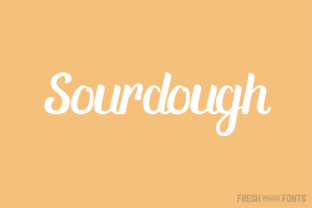
You have seen it used in branding, packaging, and social media graphics. Sourdough is a typeface that captures the warmth of hand lettering while offering a full set of glyphs for professional use. Its signature contrast between thick and thin strokes gives it a distinctive rhythm that feels both organic and deliberate. But like any specialized font, Sourdough requires a thoughtful approach. The font’s charm lies in its stylized curves and the subtle irregularities that mimic a real pen. Yet many users download it, apply it, and wonder why their project looks messy, unreadable, or out of place. That gap between expectation and result usually comes down to a few common mistakes. Let’s walk through them so you can use Sourdough with confidence and get the polished outcome you are after.
Mistake 1: Ignoring the Ligature Requirement
Sourdough is built in OTF format and includes over 200 glyphs. Those glyphs are designed to interact through ligatures—special character combinations that replace standard letter pairs with more graceful, connected forms. Without a program that supports ligatures, you will not see the font as it was intended. Common software like Adobe Illustrator, InDesign, Photoshop, and even recent versions of Microsoft Word and Affinity Publisher handle OTF ligatures well. But basic text editors, older office suites, and many free online design tools do not. If you type “fi” or “fl” and see awkward collisions or disconnected strokes, the font is working without its engine.
What happens when you ignore this
Your text looks clunky. The very feature that makes Sourdough elegant—the smooth transitions between certain letters—vanishes. Readers may not know why it looks off, but they will sense it. For a logo, a wedding invitation, or a product label, that impression matters.
Better approach
Before you commit to Sourdough for a project, check that your design software supports OpenType features. If you are working in a web environment, use CSS rules like font-feature-settings: "liga" 1 to enable ligatures. If you are unsure, paste a test sentence into your application and look at the letter pairs “fi,” “fl,” and “ff.” They should connect smoothly. If they don’t, switch to a program that can handle them.
Mistake 2: Using Sourdough for Body Text at Small Sizes
This font was born from hand lettering. The thick and thin contrast that makes it striking at display sizes becomes a readability problem at 10 or 12 points. Thin strokes can disappear on screen or in light print, especially on uncoated paper. Beginners often see a beautiful font and want to use it everywhere, but Sourdough is not a workhorse text face.
The real cost of this mistake
Readers strain to decipher words. Headlines look great, but paragraphs become tiring. This reduces time on page, increases bounce rates for web content, and makes printed materials feel amateurish. If you are a small business owner creating a flyer or a blogger designing a homepage, you risk losing your audience’s attention before you deliver your message.
Better approach
Reserve Sourdough for headings, subheadings, short callouts, pull quotes, and any text that needs personality in 18 points or larger. Pair it with a clean, neutral sans-serif like Open Sans or a simple serif like Crimson Text for body copy. The contrast will give your design hierarchy without sacrificing readability. Test your layout at actual size—zoom to 100% on screen or print a proof.
Mistake 3: Overlooking Language and Punctuation Support
Sourdough comes with over 200 glyphs and supports multiple languages, but “multiple languages” does not mean every language. If your audience includes French, German, Spanish, or Portuguese, you are likely covered. But if you need Cyrillic, Greek, Vietnamese, or certain Central European diacritics, you must verify coverage before you build your project. The same goes for punctuation: standard marks are included, but specialized symbols like fractions, arrows, or mathematical operators may be missing.
What happens when you assume
You finish a multilingual website or a product package, and the last language check reveals missing accented characters. The font falls back to a default system font, breaking the visual identity. You then scramble to find workarounds, redesign layouts, or purchase an additional font family.
Better approach
Review the complete character map before licensing or downloading. Most font sellers provide a PDF specimen or an interactive viewer. Look for the specific diacritics and punctuation your content requires. If you work with multiple languages regularly, keep a checklist of required characters. If Sourdough lacks what you need, consider a complementary font with broader language support for your body text, while keeping Sourdough for headlines.
Mistake 4: Forgetting the Hand-Lettered Vibe Needs Breathing Room
Sourdough’s stylized letterforms have a natural rhythm, but that rhythm only works if you give each character space. Beginners often cram text together, tighten tracking, or use narrow margins to fit more content. The result is a dense, cluttered block where the thick strokes dominate and the thin strokes get lost.
Why this backfires
The font’s personality comes from the contrast and the subtle irregularities. When letters are packed too tightly, those features compete instead of complement. The design feels chaotic, not charming. This is especially damaging in logos, where every detail communicates quality.
Better approach
Use generous letter spacing—what designers call tracking. Add 10 to 30 units of tracking in your software, depending on the size. Increase line height to at least 1.4 times the font size. Leave white space around your text blocks. If you are using Sourdough for a headline, let it breathe. The font works best when it is the star of a simple layout, not competing with other elements.
Mistake 5: Choosing Sourdough Without a Clear Brand Fit
Sourdough evokes handmade, artisanal, vintage, and warm aesthetics. It fits bakeries, craft breweries, stationery brands, personal blogs, and creative agencies. But if your brand is corporate, high-tech, or minimalist, this font can send the wrong signal. I have seen entrepreneurs fall in love with the look and try to force it into a fintech app or a law firm logo. The result is visual confusion.
The impact on perception
Your audience picks up on mismatched typography even if they cannot name it. A tech startup using a hand-lettered font may seem unserious. A healthcare provider using it may feel unprofessional. The font choice shapes trust, credibility, and emotional response.
Better approach
Before you commit, write down three words that describe your brand personality. Then compare them to the feeling Sourdough gives you. If they align, you are on safe ground. If they clash, save this font for a side project or a specific campaign where the artisanal tone works. You can always use it for accents—like a single word in a tagline—without making it the primary typeface.
Mistake 6: Overlooking the Licensing Details
Many users grab fonts from free download sites without checking whether the license covers their intended use. Sourdough may come in free or premium versions. Some licenses allow commercial use, others restrict it to personal projects. Some limit the number of page views or users. If you are a freelancer, small business owner, or marketer, using a font without a proper license can lead to takedown notices, legal fees, or redesign costs.
How this affects you
You publish a logo, a website, or a product label. Months later, the font creator or distributor contacts you. You then either pay a retroactive license fee, remove the work, or face legal action. This is entirely avoidable.
Better approach
Read the license agreement before you download. Look for terms like “commercial use,” “web embedding,” “number of users,” and “modification rights.” If you buy from a reputable foundry, the license is usually clear. If you get it from a free source, assume it is for personal use only unless stated otherwise. When in doubt, email the creator. Most are happy to clarify and may offer an affordable commercial license.
What to Check Before You Commit to Sourdough
By now you have a clear picture: Sourdough is a beautiful, expressive font with genuine utility, but it demands respect for its technical and stylistic requirements. Before you finalize your choice, run through this short checklist.
- Software compatibility: Confirm your design tool supports OTF ligatures. Test a sentence with “fi,” “fl,” and “ff.”
- Size and application: Use Sourdough at 18 points or larger. Pair it with a neutral body font.
- Language and glyph coverage: Verify that all the characters you need—including accented letters and punctuation—are in the font.
- Spacing and layout: Plan for generous tracking and line height. Do not crowd the letters.
- Brand alignment: Ensure the hand-lettered, artisanal feel matches your project’s tone.
- License: Read the terms for commercial use, web usage, and any restrictions.
If you take these steps, Sourdough will reward you with typography that feels personal, crafted, and memorable. It is not a font you should use lightly, but when you use it well, it elevates your work. Skip the preparation, and you will likely end up rebuilding your design. The choice is yours. Make it an informed one.