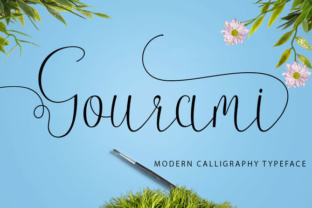
Gourami: Elevating Your Design Projects with Handwritten Elegance
In a digital landscape dominated by clean sans-serifs and predictable fonts, the desire for authentic, human-centered design has never been stronger. Whether you’re a graphic designer crafting a brand identity, a small business owner building a visual presence, or a hobbyist creating custom invitations, the right typeface does more than convey words—it communicates emotion, personality, and trust. Enter Gourami, a stunning handwritten font created by Jhoen Studio. Designed with a careful balance of elegance and legibility, Gourami brings a fluid, personal touch to any project. But what makes this font truly practical for real-world use? This article explores how Gourami addresses common typography challenges, the ways different users can leverage its features, and actionable steps to implement it effectively.
Why Handwritten Fonts Matter in Modern Design
Handwritten fonts like Gourami fill a specific need: they break through the visual noise of ordinary text. In branding, marketing materials, and digital content, audiences increasingly respond to designs that feel crafted, not manufactured. A generic font can make a brand feel distant or artificial, while a well-chosen handwritten style adds warmth, approachability, and a sense of care. However, many handwritten fonts fall short in practice—they lack proper character support, break in different software, or fail to offer enough variation to avoid repetition. That’s where Gourami’s thoughtfully engineered set of features comes into play, solving these problems for everyday users.
Common Challenges with Handwritten Typography
Before diving into how Gourami helps, it’s worth identifying the typical hurdles designers and non-designers face when working with handwritten typefaces:
- Inconsistency across platforms – Some fonts don’t render correctly in web browsers, email clients, or mobile apps.
- Lack of character variety – A simple alphabet with no alternate forms can look boring in longer text, with repeated letters standing out awkwardly.
- Poor ligature support – Without standard ligatures, natural letter connections (like “ff” or “th”) can feel disjointed.
- Limited encoding – Missing glyphs for punctuation, accents, or decorative symbols force users to fall back on plain text.
- Difficulty integrating with design software – Users may struggle to access alternates or stylistic sets without clear instructions.
These obstacles can turn a promising project into a frustrating experience. Gourami was built with these exact pain points in mind, offering a robust solution that works seamlessly for professionals and beginners alike.
How Gourami Solves Real Typography Problems
Gourami isn’t just a beautiful set of letters—it’s a practical tool equipped with features that directly address the challenges listed above. Let’s break down the key capabilities and how each one serves a specific user need.
Standard Ligatures for Natural Flow
One of the most noticeable weaknesses in many handwritten fonts is the lack of smooth letter connections. When a font doesn’t include ligatures, each character stands alone, breaking the illusion of hand-drawn text. Gourami includes standard ligatures that automatically pair common letter combinations (such as “fi,” “fl,” “ff,” and “fj”) into a single, flowing glyph. This subtle feature makes entire words appear more natural and cohesive, especially in longer passages like taglines or body text in a brochure. For a designer working on a wedding invitation, those connected letters can be the difference between a font that feels genuine and one that feels digitally stitched together.
Stylistic Alternates for Creative Freedom
Repetition is the enemy of handwritten authenticity. When the same letter “a” appears three times in one word, the visual monotony is obvious. Gourami includes stylistic alternates—different versions of certain characters that you can substitute manually or automatically via OpenType features. For example, the font may offer two or three shapes for lowercase “g,” “y,” “e,” and other frequently used letters. This variety allows you to add subtle texture to your designs, making every project feel unique. Small business owners using Gourami for social media graphics can alternate characters to keep their brand posts looking fresh without changing the overall font.
Contextual Alternates for Smarter Typesetting
Building on the alternates, contextual alternates take automation a step further. This feature adjusts letterforms based on their surrounding characters—so a letter at the beginning of a word might have a slightly different entry stroke than the same letter in the middle or at the end. The result is a dynamic, organic-looking text that mimics real handwriting even more closely. For users who are not professional typographers, contextual alternates work quietly in the background, eliminating the need to manually choose every alternate. This is especially helpful for product labels, quotes, or any text where you want the elegance of handwriting without the hassle of micro-editing.
Stylistic Sets for Thematic Variation
Beyond individual alternates, Gourami offers stylistic sets—pre-configured groups of alternate glyphs that give your text a distinct character variation. For instance, one stylistic set might replace standard capitals with more decorative swashes, while another could simplify certain letters for a cleaner, more modern look. This feature is ideal when you need to adapt a single font to different contexts: a formal set for a corporate thank-you card, a playful set for a children’s party invitation, and a clean set for a website header. Graphic designers often rely on stylistic sets to maintain brand consistency across different mediums without juggling multiple fonts.
PUA (Private Use Area) Encoding for Universal Compatibility
One of the most practical frustrations with decorative fonts is seeing placeholder boxes or question marks when you try to use special characters. Gourami addresses this with PUA (Private Use Area) encoding, which assigns all alternate glyphs, ligatures, and decorative elements to standard Unicode points. This means you can type them directly from a character map or glyph panel, and they will display correctly in almost any software—including Microsoft Word, Adobe Illustrator, Canva, and even some email clients. For users who aren’t comfortable navigating professional font menus, PUA encoding provides a straightforward way to access the full potential of the font without technical barriers.
Practical Applications: Where Gourami Excels
Knowing the features is one thing; understanding where to apply them effectively is another. Below are several use cases where Gourami truly shines, along with recommendations for getting the best results.
Branding and Logo Design
For entrepreneurs and creative professionals, a handwritten logo can convey authenticity and approachability. Gourami’s elegant swashes and varied letterforms make it ideal for wordmarks, especially for businesses in lifestyle, wellness, fashion, and wedding industries. Use the contextual alternates to give each letter a unique position, and apply a stylistic set to match your brand’s personality—soft and romantic for a florist, or bold and modern for a handmade goods shop. Because the font includes full punctuation and numbers, it can also be used for secondary text like “Est. 2023” or “Boutique Studio.”
Invitations, Cards, and Stationery
Printed materials benefit enormously from handwritten fonts because they mimic the feel of ink on paper. Gourami is an excellent choice for wedding invitations, greeting cards, save-the-dates, and thank-you notes. Combine standard ligatures for flowing names and dates, and use stylistic alternates to vary the look of repeated letters in longer text blocks like verse or program details. For DIY enthusiasts who design their own stationery, the PUA encoding ensures that all the fancy alternates you choose in your design software will print accurately without missing glyphs.
Social Media Graphics and Digital Content
In a crowded feed, design details matter. Gourami can be used for Instagram quotes, Pinterest pins, Facebook covers, or blog post headlines. Because it remains readable at medium sizes, it works well for short to medium-length captions over background photos. Try pairing it with a clean sans-serif for body text to maintain hierarchy. The font’s contextual alternates will automatically adjust letter shapes, so even a simple quote like “live with intention” looks handcrafted and unique each time you use it.
Product Packaging and Labels
For small-batch products—candles, soaps, teas, handmade chocolates—a handwritten font helps communicate artisanal quality. Gourami’s refined strokes keep it legible on small labels while offering enough decorative weight to catch the eye. Use the stylistic sets to choose a variant that matches your product’s tone: a simpler set for minimalist packaging, or a swash-heavy set for a whimsical feel. Because the font includes extended Latin characters (such as accented letters), it supports multilingual branding without extra work.
Web Design and Digital Branding
While handwritten fonts can be tricky on the web due to loading and rendering differences, Gourami performs well when used as a display font for headings or call-to-action blocks. For best results, convert it to a web font format (WOFF2) and load it via a font service or self-hosting. Keep body text in a complementary standard font to maintain readability. Use contextual alternates and ligatures in header text to create a memorable, human-centered landing page.
Recommendations for Different User Types
Not everyone approaches typography the same way. Here’s how different users can tailor their use of Gourami to their skill level and goals.
Professional Graphic Designers
Take full advantage of OpenType features: explore all stylistic sets, manually substitute alternates using the glyph panel, and create custom swash variations for specific projects. Pair Gourami with a refined serif like Garamond or a thin sans like Montserrat to let the handwritten quality stand out. Because designers often need multiple typefaces in one project, Gourami’s versatility means it can serve both as a hero font for a logo and as a subtle accent for pull quotes on the same page.
Small Business Owners & Solopreneurs
Prioritize consistency. Use Gourami for your brand headers and taglines, and pick one or two alternates that define your visual identity. Avoid switching between too many stylistic sets across different platforms—stick with one that works in all materials (social media, website, business cards). The PUA encoding makes it easy to copy-paste special characters from a character map into Canva or your website builder without needing advanced software.
Hobbyists and DIY Enthusiasts
Start with the basic lowercase and uppercase, using standard ligatures for a polished look. Experiment with one or two alternate letters from the glyph panel to see how they change the feel of your text. If you’re designing a single project (like a family reunion invitation or a holiday card), focus on the contextual alternates for a natural look with minimal manual work. Most design tools like Canva and Cricut Design Space support PUA-encoded fonts, so you can quickly access all the alternate glyphs.
Implementation Tips for Best Results
To get the most from Gourami, consider these practical steps:
- Check software compatibility: Ensure your design program supports OpenType features (Adobe programs, Affinity Designer, CorelDRAW, and even Pages on Mac). For web use, use CSS properties like
font-feature-settingsto enable ligatures and stylistic sets. - Use kerning and tracking judiciously: Handwritten fonts often look best with slightly generous letter spacing (tracking) in all caps, but tighter spacing for lowercase. Test copy at different sizes before finalizing.
- Limit the number of styles per project: A single gourami variant with one or two alternates per letter creates cohesion. Overusing alternates can make text look chaotic.
- Test print before committing: If you’re using Gourami for physical products or stationery, print a sample to verify that ligatures and alternates render as intended on your printer or production partner’s equipment.
- Respect licensing: Gourami is a premium font from Jhoen Studio. Ensure you have the appropriate license for commercial use, especially for branding, products for sale, or web embedding.
Common Mistakes to Avoid
Even with a capable font, small errors can undermine your design. Watch out for these pitfalls:
- Using too many alternates in one word: It creates a disjointed look. Apply alternates to key letters only (e.g., the first letter of a name or a repeated letter like “e”).
- Neglecting line spacing: Handwritten fonts often require slightly more leading (line height) to avoid collision between descenders and ascenders.
- Ignoring contextual alternates: If you turn them off manually, you lose the natural flow. Always enable them unless you have a specific reason not to.
- Assuming all software displays PUA glyphs equally: While most major programs do, always test in your final output (web browser, printer driver, or export format).
Conclusion: Making Gourami Work for You
Gourami is more than a pretty handwritten font—it’s a practical toolkit for anyone who wants to add authentic, human warmth to their typography without compromising on technical reliability. By leveraging standard ligatures, stylistic and contextual alternates, stylistic sets, and universal PUA encoding, you can overcome the common frustrations of working with script typefaces. Whether you are a designer crafting a brand identity, a business owner creating cohesive marketing, or a DIY enthusiast working on a single heartfelt project, Gourami offers the versatility and ease of use to turn your vision into a polished reality. Start by experimenting with its alternates in a familiar design environment, and watch how a few thoughtful letter variations can transform your message from ordinary to unforgettable.