Space Weel: Mastering the Regular, Shadow, and Inline Styles for Modern Design
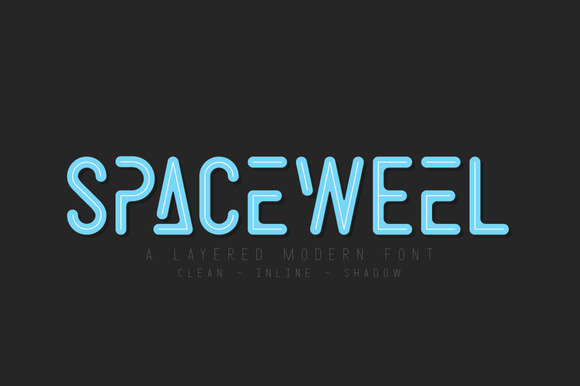
Space Weel has caught the attention of designers and creators for its distinctly futuristic, geometric character. More than just a single typeface, it arrives as a coordinated system of three matching styles: Space Weel Regular, Space Weel Shadow, and Space Weel Inline. This combination offers real flexibility, but it also introduces choices that can easily lead to disappointing results if handled without care. The visual strength that makes Space Weel exciting can quickly become visual clutter. Here we walk through the most common oversights and offer practical corrections to help you use Space Weel with precision and confidence.
Where Space Weel Works Best (and the Pitfalls of Misapplication)
The most frequent mistake with Space Weel is using it in the wrong context. Because it looks modern and clean, there is a temptation to apply it broadly across an entire project, from headlines to footnotes. Space Weel is a display typeface, built for impact and stylistic expression. It is not optimized for prolonged reading at small sizes. Using it for body text on a website or a lengthy paragraph in a printed brochure will strain the reader's eyes and dilute the font's visual power.
Instead, reserve Space Weel for moments where you need to make a statement. It excels in hero headers, branding marks, posters, gaming interfaces, and tech-oriented logo designs. The font’s retro-futuristic vibe communicates innovation and forward thinking. By confining it to display roles, you preserve its punch and create a clear visual hierarchy. Pair it with a neutral, highly legible working font for the majority of your content. This collaborative approach strengthens both the message and the medium.
The Three Styles Are a System, Not Just Options
Another area where people commonly go astray is treating Space Weel Regular, Shadow, and Inline as simple alternatives without understanding how they function best together. Each style has a distinct visual weight and purpose, and using them incorrectly can confuse your design's readability and aesthetic intent.
Let's break down the strengths of each style and how to deploy them effectively:
- Space Weel Regular: This is your clean, foundational style. It is the most readable of the three and works well for subheadings, navigation elements, and larger blocks of short text. Use it as the anchor of your typographic system. It communicates the core Space Weel aesthetic without extra decorative noise.
- Space Weel Shadow: This style adds an integrated three-dimensional effect. It creates immediate depth and a striking sculptural quality. The mistake here is using Shadow at small sizes or on complex backgrounds. The shadow effect requires enough physical space and contrast to register. Use it dominantly for hero titles or singular graphic statements where the 3D form can truly be appreciated.
- Space Weel Inline: Featuring sharp cutouts within the letterforms, Inline carries a digital, high-energy feel. It suggests circuitry, speed, and advanced technology. The common oversight is placing Inline text on a background that blends into the "inline" gaps. This renders the effect invisible and leaves you with a broken-looking letter. Dark backgrounds or high-contrast environments make Inline shine. Use it for accent words, taglines, or thematic headers in tech or gaming projects.
The better approach is to build a hierarchy with these styles. For a conference banner, use Shadow for the main event name, Regular for the date and location, and Inline for a supporting slogan. This creates a rhythmic, professional composition that leverages the full system.
Technical and Licensing Oversights to Avoid
Before integrating Space Weel into any commercial project, check the licensing specifics. A common mistake among freelancers and small business owners is using a personal desktop license for client work or digital products. Font licensing can be nuanced, and using the wrong license can lead to unexpected costs or legal issues. Always verify the End User License Agreement (EULA). Determine whether you need a desktop license for static graphics, a web license for website embedding, or an app license for mobile applications.
Another overlooked technical detail is language support and glyph coverage. While Space Weel covers standard Latin characters well, if your project requires extended Latin, Central European, or other diacritical marks, preview the full character set before buying. Discovering missing glyphs halfway through a branding project is a frustrating and avoidable delay.
Pairing Space Weel with Complementary Fonts
A subtle but damaging mistake is pairing Space Weel with another highly stylized or expressive typeface. If your headline is in Space Weel Shadow, adding a subheading in another decorative futuristic font creates visual conflict. The viewer's eye gets pulled in competing directions, and neither typeface performs its role effectively.
The remedy is contrast through simplicity. Pair Space Weel with a restrained, neutral sans-serif such as Inter, Roboto, or Work Sans. These fonts share a clean geometric foundation but remain in the background, letting Space Weel take the spotlight. For a more editorial or sophisticated feel, pair it with a highly readable serif like Lora, Source Serif Pro, or IBM Plex Serif. The traditional warmth of a serif provides a grounding counterbalance to Space Weel's modernism. For example, a startup landing page might use Space Weel Inline for the product name, Space Weel Regular for primary section headers, and a standard sans-serif for the explanatory body text. This hierarchy guides the reader naturally while maintaining a cohesive aesthetic.
Spacing, Size, and Environmental Factors
Because Space Weel's letterforms are geometric and deliberately structured, default spacing settings often require manual adjustment. The Shadow and Inline styles have additional visual mass that impacts how they sit next to one another. Cramped text in these styles loses its impact and can become difficult to decipher. Adjust tracking (letter-spacing) in your design software to give the characters breathing room. For Shadow style headlines, adding extra tracking helps the 3D effect read clearly. For Inline, generous spacing ensures the internal cutouts remain visible and distinct.
Size and resolution are equally critical. The delicate details that make Shadow and Inline appealing can vanish entirely at small point sizes or in low-resolution outputs like standard screen graphics. Avoid using these two styles for anything smaller than a large subheading. Reserve them for environments where their details can be fully rendered, such as high-resolution digital displays, large format print, or vector-based exports. Testing your chosen style at the actual size and medium it will appear in is a simple habit that prevents many layout disappointments.
Steps to Evaluate Space Weel Before Committing
Before you purchase or finalize Space Weel for a project, take these practical steps to ensure it fits your specific needs:
- Review the license thoroughly. Confirm it covers your intended use case, whether that is commercial branding, web embedding, or digital product design. If uncertain, contact the foundry directly.
- Test the font in your design environment. Download the trial version and create a mockup that mirrors your final application. Check how it renders at various sizes and on different backgrounds. Pay close attention to how Shadow and Inline behave in your specific layout.
- Evaluate the full family. Consider whether you need all three styles. Buying the complete family often provides better value and gives you maximum flexibility for future projects. Having Regular, Shadow, and Inline available allows you to adapt your typography to different contexts without resorting to artificial effects.
- Check character coverage. Ensure the font includes the specific glyphs, punctuation, and symbols your project requires. If you work with multiple languages, this step is essential.
By taking these steps, you avoid costly revisions and ensure that Space Weel serves as a genuine asset to your design toolkit rather than a source of frustration. Choosing a distinctive typeface like Space Weel is a deliberate move toward a modern, confident visual identity. Understanding how to harness its three styles, respecting its technical constraints, and pairing it wisely with supporting fonts allows you to achieve professional results that feel both futuristic and grounded. Made with careful intention, Space Weel becomes a powerful ally in communicating innovation and clarity.