Seaside: A Script Font with Character and Connectivity
If you’ve ever hunted for a script font that feels both refined and genuinely useful, you’ve likely run into the same frustration: too many options look beautiful in preview but fall apart in practice. Letters don’t connect naturally, swashes feel tacked on, and the overall effect is more “generic calligraphy” than something you’d actually want to use for a logo, invitation, or headline. That’s where Seaside steps in. It’s an elegant display script that deliberately blends classic script forms with the relaxed, expressive quality of hand lettering. The result is a typeface that feels familiar yet fresh — and, more importantly, works hard for you.
What Makes Seaside Different?
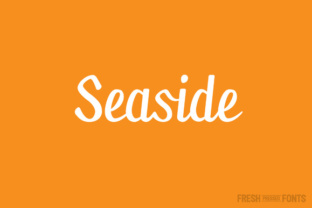
At first glance, Seaside appears to be a straightforward, graceful script. The letterforms have a natural rhythm: thick and thin strokes that mimic brushwork, but with a controlled consistency that makes it legible even in shorter headlines. What sets it apart, however, is the depth hidden beneath that clean surface. With over 30 ligatures baked into the font, you’re never left with awkward gaps or disjointed letter pairs. Ligatures are those smart replacements that automatically substitute a standard letter combination (like “th” or “fi”) with a specially designed, connected version. In a script font, ligatures are essential — they’re the difference between a string of separate letters and a word that flows like handwriting. Seaside delivers this connection consistently, across a wide range of common pairings, so your text reads as one cohesive stroke.
The font also includes more than 200 glyphs in total. That covers standard Latin characters, punctuation, symbols, and extended language support. If you’re working with accented letters for French, Spanish, German, or other European languages, Seaside has you covered. This multilingual capability is a practical advantage if your projects ever cross borders — whether you’re creating packaging for an international product or a bilingual website header. You won’t have to switch fonts mid-project just to include an “é” or “ü.”
Where Seaside Shines in Real-World Design
The beauty of a well-crafted display script is that it can serve many roles, as long as it’s used with intention. Seaside is particularly effective in situations where you need personality without sacrificing professionalism. Here are several common scenarios where this typeface truly earns its keep:
Branding and Logo Design
A script logo can signal creativity, warmth, or tradition, depending on the context. Seaside’s combination of classic proportions and hand-lettered quirks makes it versatile for businesses in fashion, beauty, food, events, and lifestyle. For a boutique bakery, a single word set in Seaside instantly conveys artisanal care. For a wedding planner’s logo, the font’s natural ligatures give the mark a custom, hand-drawn feel — even though it’s a typeface. The key is to use it as a standalone wordmark or pair it with a clean sans serif for contrast.
Invitations and Stationery
Formal events like weddings, galas, and anniversary parties demand a script that is both elegant and readable. Seaside’s generous ligature set ensures that names and dates flow smoothly across the page. Because it supports punctuation and symbols, you can write out “Saturday, September 15th, 2025 at 6:30 PM” without any missing pieces. The font also works beautifully when combined with a second typeface for body text — a light sans serif or a thin serif will keep the overall piece balanced. If you’re designing save-the-dates, place cards, or menu cards, Seaside adds a tactile, human touch without appearing overly ornate.
Social Media and Digital Content
Instagram quotes, Pinterest pins, YouTube thumbnails — short text on screen benefits enormously from a distinctive script. Seaside’s legibility at medium sizes makes it a strong choice for hero text in social graphics. The open, airy feel of the letterforms keeps the design from feeling cluttered, even on a busy background. However, keep in mind that Seaside is an OTF font and requires software that supports OpenType features like ligatures. Most professional design apps (Adobe Illustrator, Photoshop, InDesign, Affinity, CorelDRAW) handle this easily. For web use, you’ll want to ensure your digital tool can activate ligatures, or you may see unconnected letters that defeat the purpose. Many modern website builders and social media schedulers with text editors are starting to support OpenType, but double-check before committing.
Product Packaging and Labels
On a candle jar, a cosmetic bottle, or a wine label, Seaside brings an understated elegance. Because the font includes over 200 glyphs, you can craft detailed lists of ingredients, origins, or tasting notes in a mix of languages. The ligatures help maintain a smooth visual flow even in small text blocks, though for readability, keep the point size above 12–14 for body copy. For short bursts like product names or taglines, Seaside can be sized much larger to become the visual anchor of the label. Pair it with a simple, neutral background and minimal ornamentation to let the typography do the work.
Why Ligatures Matter for Professional Results
If you’re new to working with OpenType fonts, you might wonder: why not just use any script font? The answer lies in the quality of connections. Many free or lower-end scripts either lack ligatures altogether or include only a handful. This forces you to manually adjust spacing, often leaving gaps that look amateurish. Seaside’s 30+ ligatures cover the most frequent problematic connections — like “ff,” “fi,” “fl,” “tt,” and many others. When you type the word “thrift,” the “th” pair seamlessly joins into a single flowing stroke, the “ri” connects gracefully, and the “ft” finial links without a break. These subtle details accumulate into a polished, professional appearance that viewers may not consciously notice but will definitely feel.
Another practical benefit: efficiency. With ligatures enabled, you don’t need to spend time manually kerning or adjusting individual letter pairs. The font handles the heavy lifting, so you can focus on layout, color, and overall composition. For busy designers, entrepreneurs, or content creators, that saved time adds up quickly, especially when you’re producing multiple assets for a branding project or social media campaign.
Getting the Most Out of Seaside’s Glyph Set
Beyond ligatures, Seaside includes a full complement of numerals (both lining and old-style figures, though check the specific version), standard punctuation, and currency symbols. This means you can write prices, dates, and addresses without resorting to a backup font. For small business owners creating their own promotional materials, this all-in-one glyph set reduces complexity. You don’t need to juggle three different fonts to get a complete look.
When using Seaside, keep these tips in mind:
- Enable ligatures in your software. In Adobe applications, this is usually found in the OpenType panel or Character panel menu. In other tools, look for “Discretionary Ligatures” or “Contextual Alternates.” Without them, the font loses its main selling point.
- Use Seaside at display sizes. As a display script, it excels between 18 and 72 points for headlines, logos, and short phrases. For longer passages of text, consider a complementary sans serif or serif for readability.
- Pair with a neutral counterpart. Good companions include Montserrat, Open Sans, Lato, or any geometric sans serif. The contrast between a clean sans and Seaside’s organic flow creates hierarchy and visual interest.
- Preview multilingual text early. If your project requires French or German text, test the accented characters before finalizing. Seaside’s support is extensive, but it’s always wise to verify that all needed combinations exist in the OTF file.
Practical Considerations Before You Invest
No font is perfect for every job, and Seaside has its own strengths and limitations. Because it relies on ligatures for its signature look, you must work in an environment that supports OpenType. That rules out many basic text editors, free online design tools, and legacy software. If your workflow is primarily in Canva, for example, you may only have access to a simplified version unless you upload the OTF file and the tool supports advanced typographic features. The same applies to word processors like Google Docs or Microsoft Word — they can use the font but may not activate ligatures automatically. For those platforms, you might need to manually insert the glyphs via the glyph panel, which adds friction.
Also, note that display scripts are best used sparingly. If you overuse Seaside — for example, setting an entire website paragraph or a lengthy document in it — readability will suffer. The charm of the font lies in its hand-lettered feel, which becomes overwhelming in dense text blocks. Reserve it for headlines, subheadings, pull quotes, and short copy where its personality can shine without fatiguing the reader.
For entrepreneurs and small business owners creating their own marketing materials, Seaside represents a reliable investment. The combination of elegant design, extensive ligatures, and broad language support reduces the need for additional fonts or manual tweaking. You get a finished look with less effort, which is exactly what a busy professional needs. For educators creating classroom posters, bloggers crafting custom headers, or freelancers building client logos, the same benefits apply: more time designing, less time fixing connections.
A Final Word on Choosing Seaside for Your Projects
The best fonts are the ones that let you work smarter while producing better-looking results. Seaside achieves that balance by delivering a script that is simultaneously classic and contemporary, connected and customizable. Its generous ligature set saves you from tedious manual spacing, its extensive glyph library supports real-world multilingual needs, and its open, airy letterforms bring a human warmth to digital and print projects alike. Whether you’re designing a wedding suite, a brand identity, or a social media template, Seaside gives you the polished finish of custom lettering without the custom price tag. Just make sure your software can handle OpenType features, and you’ll have a reliable partner for all your script typography needs.