RosemaryUP: A Handwritten Font That Balances Personality with Professional Utility
Typography often determines whether a design feels generic or memorably human. In a landscape crowded with clean sans-serifs and rigid display faces, script fonts offer a distinct alternative—but not all scripts are created equal. RosemaryUP stands out as a handwritten and hand-drawn script font that aims to deliver both charm and readability without sacrificing practicality. For designers, marketers, and content creators who need a personal touch that still respects layout constraints, it warrants a closer look.
What Is RosemaryUP? A Hand-Drawn Script with Intent
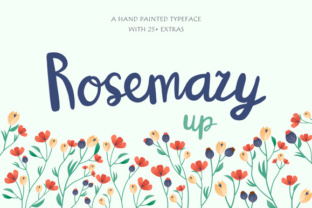
RosemaryUP is a script typeface built from actual hand-drawn letterforms, meaning each character carries the natural variation, slight imperfections, and emotional weight of someone writing by hand. It is not simply a digitized version of a handwriting style—it is a crafted set of glyphs designed to reproduce the warmth of pen on paper while functioning reliably in digital environments. The font includes both uppercase and lowercase letters, numerals, punctuation, and a range of ligatures that help maintain fluidity when letters connect.
The hand-drawn nature of RosemaryUP distinguishes it from many script fonts that rely on smooth vector curves with little personality. Here, stroke widths vary subtly, and ascenders and descenders have an organic angle. The overall impression is casual yet deliberate—like a carefully penned note rather than a casual scribble.
Natural Variation Without Distraction
One of the frequent complaints about script fonts is that they look too uniform to be convincing. RosemaryUP addresses this by introducing slight irregularities in character shapes without crossing into sloppiness. The letter spacing is designed to feel loose enough to breathe, but tight enough to avoid disjointedness. For a handwritten font, that balance is crucial—it allows the text to be read quickly while retaining personality.
Readability as a Priority
Many script fonts sacrifice legibility for artistic flair. RosemaryUP maintains a moderate x-height and open counters (the enclosed spaces in letters like 'e' and 'a'), which helps even in smaller sizes. This makes it viable not only for headlines but also for short paragraphs, quotes, or callout text in digital and print contexts. The font performs well at 14–24pt range for body-like usage; below 12pt, the handwritten details can become muddied, so it is best reserved for applications where size allows the texture to be appreciated.
Versatile Application Range
From branding materials to wedding invitations, social media graphics to product labels, RosemaryUP adapts to a variety of contexts. Its casual tone works well for:
- Brand identities for creative services (photography, design studios, boutique agencies)
- Personal blogs and online portfolios needing a human touch
- Marketing copy for products targeting authenticity-conscious audiences
- Educational materials (worksheet headers, classroom posters) where warmth is valued
- Social media content where captions or overlays need to stand out without screaming
However, it is less suitable for long-form body text or corporate reports—the handwriting effect becomes fatiguing after several paragraphs.
Branding and Logo Work
When a brand wants to communicate approachability or artisanal quality, RosemaryUP can be a strong choice. For example, a boutique bakery's logo using RosemaryUP for the business name immediately sets a handmade expectation. The font pairs well with a clean sans-serif like Open Sans or Montserrat for secondary text, creating a contrast between the organic and the structured. In a client project for a small soap company, using RosemaryUP on product labels alongside simple line illustrations produced a cohesive, tactile feel that resonated with buyers browsing at farmers' markets.
Digital Content and Social Media
Instagram stories, Pinterest pins, and blog featured images benefit from the warmth of handwritten fonts. RosemaryUP’s readability at medium sizes means it works as a headline over an image without requiring a heavy outline or shadow. Particularly for quote graphics or simple inspirational posts, the font adds a genuine, non-corporate feel. I have tested it on a lifestyle blog’s hero headings, and the bounce in the letterforms gave the site a friendlier first impression compared to the previous geometric sans.
Print Materials with a Personal Feel
Wedding invites, save-the-dates, greeting cards, and small-run zines are natural fits. Because RosemaryUP includes ligatures (such as 'th', 'he', 'an'), the text flows in a way that mimics genuine cursive. This reduces the need for manual character adjustment when typesetting short phrases. One test project placed RosemaryUP on a thank-you card for event guests; the handwritten look made the gesture feel more sincere, even though it was printed.
Glyph Set and Language Support
RosemaryUP covers most Western European languages, including accented characters for French, Spanish, German, and others. This is sufficient for the majority of commercial projects within those regions. It does not include Cyrillic, Greek, or East Asian scripts, which is typical for a font in this category. The set includes basic punctuation and a few decorative swashes, though not an extensive alternates library. For a font positioned as hand-drawn, the ligature coverage is adequate, but power users may wish for more stylistic sets to vary the appearance of repeated letters.
File Format and Installation
The font is available in standard formats (OTF, TTF, WOFF, WOFF2) and works across macOS, Windows, and Linux, as well as most design software like Adobe Creative Cloud, Figma, and Canva. Web licensing is straightforward, and the file sizes are reasonable (under 100KB per weight). There are usually only one weight (regular) supplied, which limits bold variations. If you need heavier emphasis, you will have to either rely on CSS font-weight stretching (which may not look natural) or combine with a distinct bold script—something to consider before committing.
Unexpected Limitation: No Italic or Bold
Because the font is inherently cursive, an italic style would be redundant. However, the lack of a true bold weight means that for headings requiring strong emphasis, you may need to increase size or use a complementary serif or sans. In layouts where hierarchy matters, this can be a constraint. Some font distributors offer multiple weights from the same designer; if your workflow relies on weight contrast, check whether a heavier complementary font is available.
Who Benefits Most from RosemaryUP?
After evaluating this font across several use cases, the audience that gains the most value includes:
- Freelance graphic designers needing a go-to handwritten option for client projects that demand personality but not extreme stylization.
- Small business owners who manage their own branding and want a font that feels authentic without requiring custom lettering.
- Bloggers and content creators who post regularly and want a consistent, warm header font that differentiates their work from templated looks.
- Event planners and invitation designers who need a reliable, legible script for multiple event types.
- Educators creating worksheets or classroom materials where a friendly tone helps engagement.
Conversely, professionals working on high-volume corporate collateral, technical documentation, or any medium requiring dense text should skip RosemaryUP. Script fonts, even well-made ones, are not designed for extended reading comfort.
Long-Term Value and Practical Recommendations
RosemaryUP is not a font that will feel dated quickly, because its hand-drawn quality aligns with a long-standing preference for humanized design. Provided the designer uses it intentionally—pairing it with neutral backgrounds and enough whitespace—it will age well. However, the single-weight limitation may encourage you to invest in a family with more variants if you expect heavy usage. For occasional projects or as a secondary font in a larger library, it is a solid asset.
Before purchasing, I recommend testing it in your actual workflow. Place a few headlines in context, check how the ligatures render at your typical output sizes, and view it on both screen and paper. Small previews on a designer’s site can be misleading—real-world usage reveals whether the font meets your specific needs.
Pairing Suggestions for Maximum Effectiveness
- Use a clean sans-serif like Work Sans or Nunito for body text to offset the organic headers.
- Add a subtle text shadow or slight letterpress effect to enhance the handwritten depth in print.
- Avoid using all caps with RosemaryUP—uppercase forms break the cursive flow and seem forced.
- Keep line height generous (1.5–1.8) when using RosemaryUP in short paragraphs to maintain legibility.
Final Thoughts on RosemaryUP’s Place in Your Toolkit
RosemaryUP succeeds as a handwritten script font because it does not try to be everything. It accepts its role as a personal, approachable typeface and executes it with care. The hand-drawn foundation gives it character that machine-made scripts cannot replicate, yet it remains functional enough for real design work. If you have been looking for a script that adds sincerity without sacrificing readability, and if your projects benefit from a human touch, RosemaryUP deserves a space in your font collection. Just be mindful of its single-weight limitation and respect its natural size sweet spot—used wisely, it will elevate your designs without overshadowing the message.