Bonita – The Italic Script Font That Fits Into Everyday Work
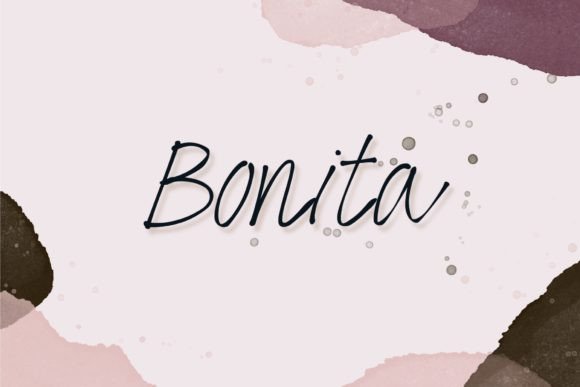
If you have ever searched for a script font that feels both elegant and approachable, you have probably run into the same problem: most script fonts are either too ornate to read or too casual to use professionally. Bonita tries to solve that. It is an italic type script font with clean lines, a gentle slant, and enough personality to stand out without shouting. Whether you are designing a wedding invitation or formatting a product label, Bonita might be the middle ground you need.
What Makes Bonita Different
Bonita is not just another cursive font. Its letterforms are designed to be readable at smaller sizes, which is rare for italic scripts. The strokes are consistent, the ascenders and descenders are balanced, and the overall flow feels natural rather than forced. This means you can use it for body text in a flyer or for headings in a blog post without worrying that people will struggle to read it. The italic style gives it motion, making it suitable for projects that need a human touch.
Realistically, if you are a small business owner designing your own marketing materials, you do not have time to tweak kerning or adjust spacing manually. Bonita comes with OpenType features like ligatures and stylistic alternates that help you get a polished look with minimal effort. That is one less thing to worry about when you are juggling inventory, customer emails, and social media posts.
Branding for Small Businesses
When you are building a brand from scratch, the font you choose says a lot about your business. Bonita works well for boutique shops, bakeries, florists, or any business that wants to communicate warmth and quality. Pair it with a clean sans-serif font for your logo, and use Bonita for taglines, business cards, and packaging inserts. The italic script adds a handcrafted feel that can make your brand look more personal than corporate competitors.
For example, a local coffee shop owner might use Bonita for the menu board headers and then again on the loyalty card. The script ties the visuals together without looking like a cookie-cutter template.
Social Media Graphics
Instagram quotes, Facebook covers, Pinterest pins – all of these need typography that catches the eye but stays legible on a small screen. Bonita's italic form adds movement, making your text feel less static. Use it for short phrases or highlighted words. Just keep the copy brief; script fonts are not ideal for long paragraphs on social media. A freelancer offering design tips could use Bonita to emphasize key words in their posts, building a cohesive visual style without investing in expensive branding.
Print Collateral
Bonita is not just for digital screens. It works nicely on paper. Wedding invitations, save-the-dates, thank-you cards, and other special occasion prints benefit from a script that is elegant but not fussy. Event planners often need to produce materials quickly, and Bonita's readability helps ensure that guests can actually read the date and location. If you are a wedding planner, you can recommend Bonita to clients who want a traditional look without going for ultra-formal calligraphy.
Bullet Journals and Planners
For hobbyists and journal keepers, Bonita can be a fun addition to headers and decorative elements. Since it is a digital font, you can use it in design software to create printable inserts or stickers. A bullet journal enthusiast might design a weekly spread header in Bonita, print it out, and paste it into their notebook. The italic style adds flair without requiring manual lettering skills.
Digital Products and Printables
If you sell digital planners, e-books, or templates on platforms like Etsy, Bonita can differentiate your products. Many creators use it for chapter titles, section dividers, or motivational quotes. Because Bonita includes OpenType features, you can create different versions of the same product by swapping out alternates, giving customers variety. A blogger selling a course outline PDF could use Bonita for the header, making the resource feel more polished and encouraging downloads.
Invitations for Personal Events
Birthday parties, baby showers, holiday gatherings – when you want to send something nicer than a mass-produced e-vite, Bonita helps you do it yourself. Download the font, open Canva or similar tool, and design a simple invitation with a handwritten feel. Your guests will notice the effort, and you save money on hiring a designer.
Educational and Non-Profit Use
Teachers, educators, and non-profit organizers often have tight budgets but still need materials that look professional. Bonita can be used for classroom posters, workshop flyers, and information sheets. A teacher creating a reading corner sign might use Bonita for the title "Book Nook" to make it inviting for students. Because the font is legible even at moderate sizes, it is suitable for materials aimed at adults and older children.
What to Consider Before Using Bonita
No font works everywhere. Here are practical things to keep in mind before you commit to Bonita in a project.
- Legibility at very small sizes. While Bonita is more readable than many scripts, it is still a script font. Avoid using it for body text below 10pt, especially in print. For digital body text, stick to 16px or larger.
- Pairing with other fonts. Bonita works best with simple sans-serif fonts like Montserrat, Lato, or Open Sans. Avoid pairing it with another decorative script, as that can look cluttered.
- File format and licensing. Check whether you have the right license for commercial use if you are selling products or using it in a business logo. Free versions may have restrictions.
- Context. Bonita leans feminine and romantic. It may not suit corporate reports, legal documents, or industrial brands. Consider your audience before finalizing.
- Testing. Always preview your design in the final medium (screen, paper, signage) before printing large quantities. What looks good on a monitor may not work on a banner.
Who Benefits Most from Bonita
Bonita is especially useful for people who need a quick, attractive script without custom lettering. If you are a small business owner designing your own menus and signage, Bonita saves time. If you are a freelance marketer creating social media templates for multiple clients, Bonita adds a consistent elegant touch. If you are a hobbyist making printables for your own use or for sale, Bonita is a reliable choice that customers will appreciate.
Educators who want to add visual interest to handouts can use Bonita sparingly. Bloggers can use it for pull quotes or hero text. Even a non-profit volunteer designing a fundraising poster can benefit from its accessible charm.
Practical Example: A Day with Bonita
Imagine a freelance graphic designer who works from home. She receives a request from a local bakery for a flyer advertising a new pastry line. She opens her design software, pulls up Bonita, and types the headline: "New Croissants Arriving Daily." She pairs it with a clean sans-serif for the details, adjusts spacing using the OpenType alternates, and sends a draft to the client within an hour. The client loves the handmade feel. Later that day, she uses the same font to create her own Instagram story announcing a discount on her services. The consistent style builds her personal brand without extra effort.
That is the kind of real-world utility Bonita offers. It is not a font that demands a lot of you. It works in the background, making your text look intentional.
Final Thoughts on Bonita
Bonita is an italic script font that balances beauty and function. It fits into many scenarios because it is designed with everyday use in mind. You do not need to be a professional typographer to get good results. As long as you consider where and how you apply it, Bonita can elevate your projects without causing headaches. Whether you are creating content for a brand, planning a special event, or simply enjoying a creative hobby, this font gives your words a gentle, italic rhythm that feels both classic and current.