Vanessa Handscript – A Versatile Font for Creators
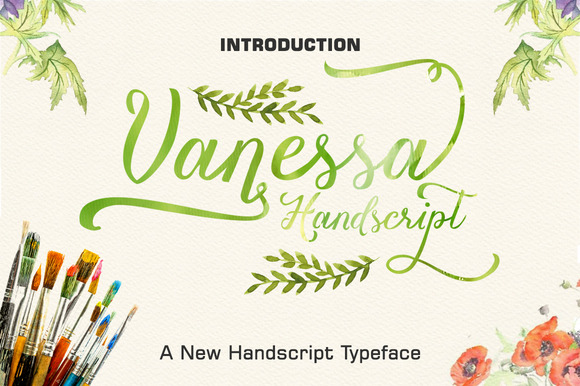
When you are working on a project that calls for a personal, handcrafted feel, choosing the right typeface can make all the difference. Many digital fonts look clean and professional, but they can also feel impersonal. That is where Vanessa Handscript steps in. Created by LostvolType, this handwritten font brings warmth and character to your designs while offering surprising flexibility under the hood.
Vanessa Handscript is more than just a pretty set of letters. With 402 unique characters including 202 alternate glyphs, it gives you room to customize and vary your text naturally. The font is PUA encoded, which means you can access those alternates and decorative swashes easily, even in applications that lack a traditional glyphs panel. This makes it a practical choice for users of Cricut Design Space, Silhouette Studio, and similar software where font customization is often limited.
What Vanessa Handscript Brings to Your Projects
The first thing you notice about Vanessa Handscript is its flowing, organic style. The letters are connected in a way that mimics natural handwriting, with varying stroke weights and graceful swashes that add movement. But the real value lies in what happens when you start using it in real projects.
Because the font includes so many alternates, you can avoid the repeating-letter problem that plagues many handwritten fonts. Instead of seeing the same “e” or “s” over and over, you get variety that feels authentic. This is especially important when you are creating longer text passages like quotes, invitations, or social media captions. The eye picks up on repetition quickly, and that can undermine the handmade look you are trying to achieve.
The swashes and swooshes included in Vanessa Handscript add another layer of polish. You can use them as decorative flourishes at the beginning or end of a word, or integrate them into titles and headers for extra elegance. Because the font is PUA encoded, inserting these extras is straightforward even in software like Cricut Design Space, where you would typically need to rely on character maps or workarounds.
Practical Benefits for Design Work and Beyond
One of the most practical advantages of Vanessa Handscript is how it simplifies the design process when you are working with limited tools. If you use Cricut or Silhouette machines for crafts, you know that accessing special characters can be a hassle. Many beautiful fonts require you to open a separate glyph panel in Adobe Illustrator or similar software just to use alternates. Vanessa Handscript bypasses that frustration. Because the font is PUA encoded, you can type alternates directly by using specific keystrokes, or copy them from a character map and paste them into your design space. This saves time and keeps your workflow smooth.
For small business owners and entrepreneurs, this font can help you create branded materials that look custom without hiring a designer. Imagine using Vanessa Handscript for your logo, product labels, or social media graphics. The handwritten style conveys approachability and care, which is valuable if you run a boutique, a bakery, a wedding planning service, or any business where personal connection matters. You can pair it with a clean sans-serif font for contrast, letting the handwriting take center stage on headings or accents.
Marketers and bloggers will find Vanessa Handscript useful for call-to-action buttons, pull quotes, and headers that need a human touch. In a digital landscape where so much content feels manufactured, a handwritten element can help your message stand out. It invites the reader in and suggests a real person wrote it, not just a template.
Who May Find Vanessa Handscript Most Useful
While this font has broad appeal, certain groups will get the most out of it. Crafters who use Cricut or Silhouette machines will appreciate the ease of access to alternates and swashes. If you make greeting cards, custom apparel, home decor signs, or party decorations, Vanessa Handscript gives you the flexibility to vary your text without needing extra software.
Wedding and event planners can use this font for invitations, place cards, and signage. The elegant swashes fit well with romantic or vintage themes, and the natural handwriting style feels personal even when you are producing dozens of pieces. Educators and homeschool parents might use it for worksheets, classroom decor, or certificates where a friendly handwritten look is more inviting than a rigid textbook font.
Freelance designers and illustrators can add Vanessa Handscript to their toolkit for client projects that call for a hand-lettered aesthetic without the time investment of drawing each letter by hand. Because the font includes so many alternates, you can still achieve a custom feel. And since it works in applications without a glyph panel, you can use it even when collaborating with clients who use simpler software.
How Vanessa Handscript Simplifies Creative Workflows
Beyond aesthetics, this font can actually save you time in several ways. First, the large character set means you do not need to manually edit letters to create variety. You can type a word, swap in an alternate for the first and last letter, and you are done. Second, because the swashes are built into the font and accessible through PUA encoding, you do not have to draw or import decorative elements separately. This keeps your file size smaller and your editing process cleaner.
If you work with applications that support OpenType features, you can take advantage of stylistic alternates and contextual alternates, which automatically replace certain letters depending on their position in a word. This gives you even more natural variation without extra effort. For those using applications like Cricut Design Space or Silhouette Studio, you can still access the alternates by using a character map or a simple reference guide. Many font sellers provide a cheat sheet for Vanessa Handscript that shows which keys correspond to which alternates, so you can keep it open while you work.
This font also works well for longer projects because it remains readable at moderate sizes. The letterforms are distinct enough that you can use it for body text in short documents, though it shines brightest in headlines, titles, and medium-length passages. For very long blocks of text, pairing it with a simple serif or sans-serif font improves readability while keeping the handwritten accent where it matters most.
A Few Considerations Before You Choose
Like any tool, Vanessa Handscript has contexts where it works best and others where you might want to compare options. Because it is a handwritten font, it carries a casual, personal tone. That makes it ideal for invitations, branding for creative businesses, and social media graphics. However, if you need a font for a formal corporate document, legal notice, or highly technical content, a more neutral typeface would be appropriate. The style should match the message you are sending.
Also, while the font works with applications that lack a glyph panel, you will still need to learn how to access the alternates using your specific software. In Cricut Design Space, for example, you may need to use the Windows Character Map or a similar tool to copy and paste special characters. This is a one-time learning curve that pays off quickly, but it is worth planning for. If you are already comfortable with using character maps or font helper apps, you will find the process straightforward.
Another point to consider is file format and compatibility. Vanessa Handscript is typically offered as an OTF or TTF file. Both work well on Windows and Mac, and both support PUA encoding. Make sure your operating system and software are up to date to avoid any issues with character rendering. Most modern design applications handle PUA fonts without problems, but checking compatibility beforehand can save frustration.
Practical Use Cases to Consider
If you are still wondering whether Vanessa Handscript fits your needs, think about the specific projects you have coming up. For a small business owner designing a new product label, this font can convey quality and care. For a bridesmaid designing wedding invitations, the swashes add elegance without extra cost. For a teacher creating a classroom sign, the friendly handwriting invites engagement.
One approach is to use Vanessa Handscript for the main text of a design and pair it with a minimalist font for supporting information. For example, on a save-the-date card, the event name could be in Vanessa Handscript, while the date and location are in a clean sans-serif. This creates hierarchy and visual interest while keeping the design balanced.
You can also use the alternates to create a custom look for repeated words. If your brand name appears multiple times on a website or packaging, you can vary the letters so each instance looks slightly different. This subtle variation mimics real handwriting and adds depth to your visual identity.
For bloggers and content creators, Vanessa Handscript works well for quote graphics, Pinterest pins, and Instagram posts. The swashes can frame the text attractively, and the handwritten style feels authentic in a space where users value genuine connection. Pair it with a neutral background and your brand colors for a cohesive look.
Final Thoughts on Vanessa Handscript
Vanessa Handscript by LostvolType offers a thoughtful combination of beauty and practicality. With 402 characters, 202 alternates, and PUA encoding, it addresses common frustrations that crafters and designers face when working with handwritten fonts. The ability to use it in applications without a glyph panel, like Cricut Design Space and Silhouette Studio, makes it especially valuable for anyone who works outside the Adobe ecosystem.
That said, the best font for any project depends on your audience, your message, and the medium you are working in. Vanessa Handscript excels in contexts where warmth, personality, and a handmade feel are assets. It helps you create designs that look custom and thoughtful without requiring advanced technical skills or additional software. If your work calls for that human touch, this font is worth adding to your collection.